<?xml version="1.0" encoding="utf-8"?><feed xmlns="http://www.w3.org/2005/Atom" ><generator uri="https://jekyllrb.com/" version="4.0.1">Jekyll</generator><link href="http://kylepls.com/feed.xml" rel="self" type="application/atom+xml" /><link href="http://kylepls.com/" rel="alternate" type="text/html" /><updated>2025-09-23T01:31:53+00:00</updated><id>http://kylepls.com/feed.xml</id><title type="html">Cool Stuff Here</title><subtitle>I create way more stuff then I care to document.  Here lies the projects I did end up writing about.</subtitle><entry><title type="html">Writing a Low-Budget Subnautica Ripoff In C</title><link href="http://kylepls.com/boids" rel="alternate" type="text/html" title="Writing a Low-Budget Subnautica Ripoff In C" /><published>2021-08-21T00:00:00+00:00</published><updated>2021-08-21T00:00:00+00:00</updated><id>http://kylepls.com/boids</id><content type="html" xml:base="http://kylepls.com/boids"><![CDATA[<h2 id="table-of-contents">Table of Contents</h2>

<ul class="no_toc" id="markdown-toc">
  <li><a href="#table-of-contents" id="markdown-toc-table-of-contents">Table of Contents</a></li>
  <li><a href="#introduction" id="markdown-toc-introduction">Introduction</a></li>
  <li><a href="#where-to-start" id="markdown-toc-where-to-start">Where to start?</a></li>
  <li><a href="#super-simple-world-generation" id="markdown-toc-super-simple-world-generation">Super Simple World Generation</a>    <ul>
      <li><a href="#what-is-a-marched-cube" id="markdown-toc-what-is-a-marched-cube">What is a marched cube?</a></li>
      <li><a href="#generating-world-like-scalar-vector-fields" id="markdown-toc-generating-world-like-scalar-vector-fields">Generating World-like Scalar Vector Fields</a></li>
      <li><a href="#the-basic-approach" id="markdown-toc-the-basic-approach">The basic approach</a></li>
      <li><a href="#first-try" id="markdown-toc-first-try">First Try</a></li>
      <li><a href="#shaders" id="markdown-toc-shaders">Shaders</a></li>
      <li><a href="#back-to-boids" id="markdown-toc-back-to-boids">Back to Boids</a>        <ul>
          <li><a href="#terrain-collision" id="markdown-toc-terrain-collision">Terrain Collision</a>            <ul>
              <li><a href="#voxel-raycasting" id="markdown-toc-voxel-raycasting">Voxel Raycasting</a></li>
              <li><a href="#ray-triangle-intersection" id="markdown-toc-ray-triangle-intersection">Ray-triangle Intersection</a></li>
              <li><a href="#wait-turn-around" id="markdown-toc-wait-turn-around">Wait… Turn around!</a></li>
              <li><a href="#integration-hell" id="markdown-toc-integration-hell">Integration Hell</a></li>
            </ul>
          </li>
        </ul>
      </li>
    </ul>
  </li>
  <li><a href="#small-improvements" id="markdown-toc-small-improvements">Small Improvements</a>    <ul>
      <li><a href="#no-more-stockfish" id="markdown-toc-no-more-stockfish">No more stockfish</a></li>
      <li><a href="#hide-the-world-generation" id="markdown-toc-hide-the-world-generation">Hide the world generation</a></li>
      <li><a href="#caustics" id="markdown-toc-caustics">Caustics</a></li>
      <li><a href="#ambient-occlusion" id="markdown-toc-ambient-occlusion">Ambient Occlusion</a></li>
    </ul>
  </li>
  <li><a href="#the-final-result" id="markdown-toc-the-final-result">The Final Result</a></li>
</ul>

<h1 id="introduction">Introduction</h1>

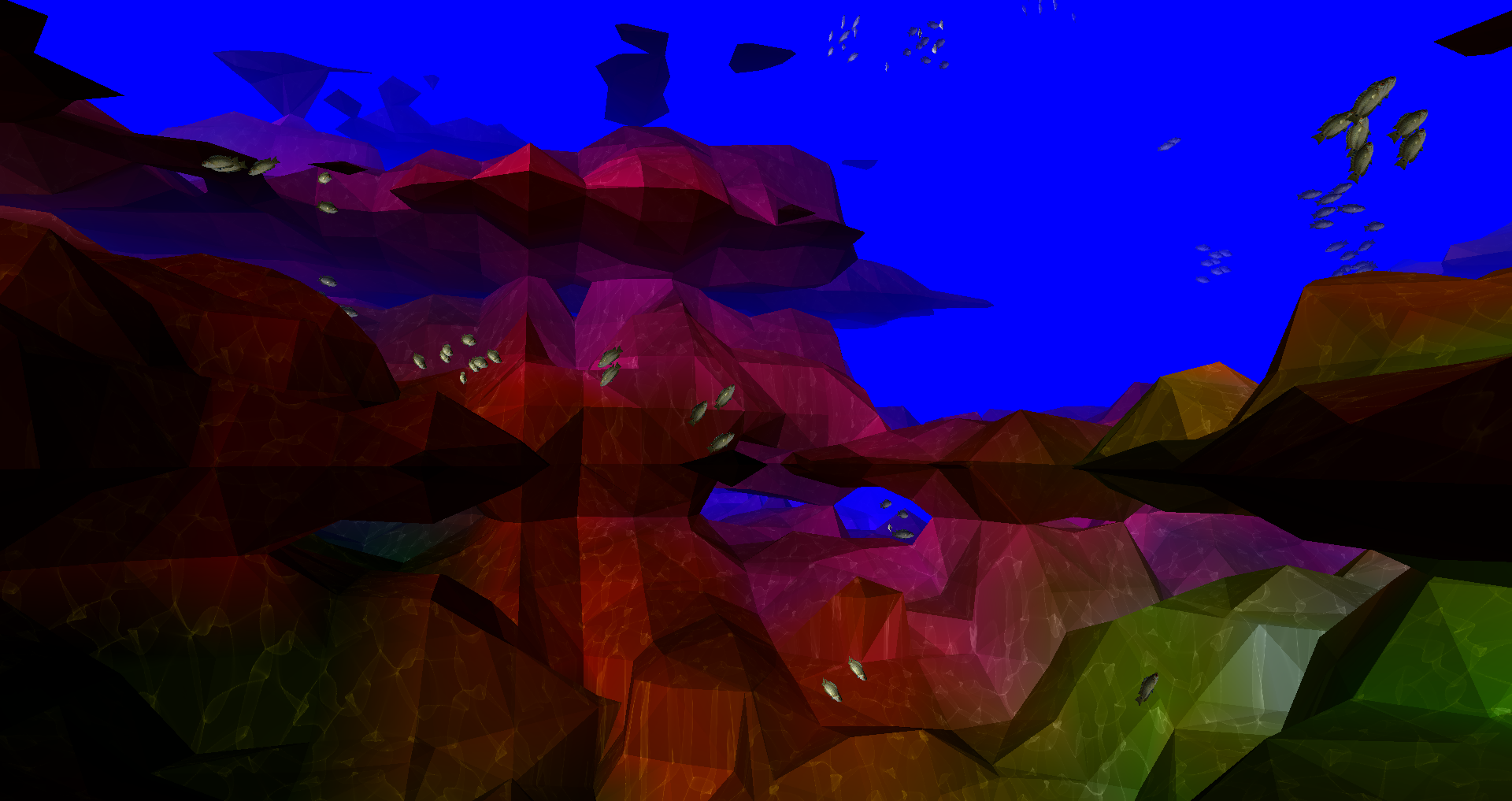
<p><img src="/assets/boids/header-image.png" alt="" /></p>

<p>This picture shows the final result of a 2-semester long project to construct an underwater scene in C/OpenGL. It took a
lot of work to get to that point as almost everything had to be written from scratch. There are no fancy libraries or
game engines, just pure pain. Before I get too far into this, this is not some highly original concept. I was inspired
to recreate this scene from the video below. I’ll also be borrowing some ideas to make this all work.</p>

<iframe width="853" height="480" src="https://www.youtube.com/embed/bqtqltqcQhw?t=494" title="YouTube video player" frameborder="0" allow="accelerometer; autoplay; clipboard-write; encrypted-media; gyroscope; picture-in-picture" allowfullscreen=""></iframe>

<h1 id="where-to-start">Where to start?</h1>

<p>It’s hard to figure out how to get going on a project like this. What should come first, the fish or the terrain? I
decided on starting with Boids and pushing the nightmare that is terrain generation onto the backlog.</p>

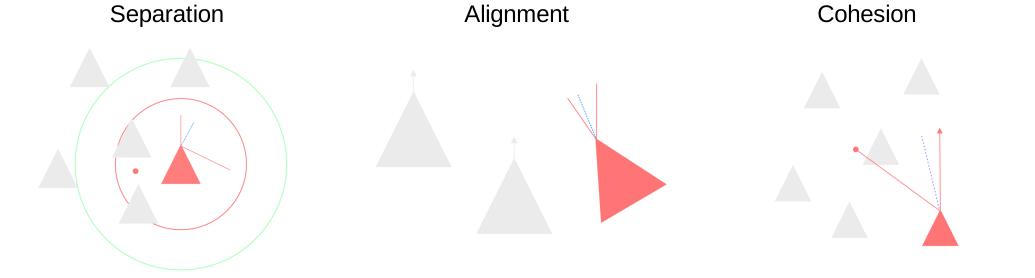
<p>The Boids algorithm isn’t really a tough egg to crack. For those unfamiliar, it’s just 3 simple rules:</p>

<ol>
  <li>Separation - Boids want to be close to each other, but not too close. Apply a strong repulsive force if boids get too
close to one another.</li>
  <li>Alignment - Try to point in the same direction as other boids around you.</li>
  <li>Cohesion - The opposite of separation, move towards the centroid of nearby boids. This causes boids to want to stay
together.</li>
</ol>

<p>Put visually:</p>

<p><img src="/assets/boids/boids.svg" alt="" /></p>

<p>See <a href="http://www.red3d.com/cwr/boids/">Boids - Background and Update, Craig Reynolds</a> for more details.</p>

<p>That’s really it, for now. We’ll come back to this later.</p>

<h1 id="super-simple-world-generation">Super Simple World Generation</h1>

<p>Okay, I may have lied; this part was sheer pain. Anyway, let’s get into it. Inspired by the video linked above, I
wanted to generate a world with the <a href="https://en.wikipedia.org/wiki/Marching_cubes">Marching Cubes</a>
algorithm - <a href="https://en.wikipedia.org/wiki/Marching_tetrahedra">Marching Tetrahedra</a> struck me as a bit intimidating.</p>

<h2 id="what-is-a-marched-cube">What is a marched cube?</h2>

<p>The marching cubes algorithm explains how to generate a set of triangles to approximate a scalar vector field. More
simply, if you have points in a 3D space, this is how you generate triangles to approximate a ‘surface’ that those
points would create. Don’t worry too much if my 2-sentence crash course didn’t do the trick, there are going to be some
helpful graphics below.</p>

<h2 id="generating-world-like-scalar-vector-fields">Generating World-like Scalar Vector Fields</h2>

<p>Marching cubes is not something that will generate a world in isolation. There has to be some sort of input. Marching
cubes takes in a function and outputs a set of triangles. So what should that function be? Well, the good news is that I
don’t have to solve this problem. Smarter people have come along and tackled this a long time
ago. <a href="https://en.wikipedia.org/wiki/Perlin_noise">Perlin noise</a> is a multidimensional function which when paired with
marching cubes produces life-like terrain. Again, we’ll visualize this process below, keep going!</p>

<p><em>It should be noted that I’ll use Simplex &amp; Perlin Noise interchangeably here. For all intents and purposes, they’re the
same thing, though Simplex is much faster.</em></p>

<h2 id="the-basic-approach">The basic approach</h2>

<p>Here’s the 4-step plan to get the world generation working:</p>

<p><img src="/assets/boids/generation-flow.svg" alt="" /></p>

<p>In hindsight, it was not that easy.</p>

<h2 id="first-try">First Try</h2>

<iframe width="876" height="456" src="https://www.youtube.com/embed/DocenWwFrmc" title="YouTube video player" frameborder="0" allow="accelerometer; autoplay; clipboard-write; encrypted-media; gyroscope; picture-in-picture" allowfullscreen=""></iframe>

<p>The above shows my first crack at my 4-step plan. There are also a few boids in there - because why not. It may be
apparent that this is pretty terrible. Firstly, we need some colors. This could be done in many different ways; the
approach I went with uses the noise function to generate a lower frequency function mapped to a color. So when I
assign a noise value to a point, I also generate a color value.</p>

<p>Next, the size of the world has to be a lot larger. I had a small world initially because the program was terribly
unoptimized. The problem is that I have an awesome GPU capable of handling these complex calculations in parallel but
instead chose to do each calculation sequentially on the CPU. For prototyping this was fine, but it was time to get into
the nasty stuff.</p>

<h2 id="shaders">Shaders</h2>

<p>Before, all the work for drawing the world was being done on the CPU. This is only okay for small amounts of work. In my
case, I wanted to recreate the entire world every frame so the CPU was not going to cut it. While a CPU has maybe 8
cores, a GPU has many, many more cores. This means that parallel workloads can be completed much faster. Moving the
relevant calculations over to the GPU is not a trivial task.</p>

<p>Firstly, a VBO is assigned. This is a block of memory reserved in the GPU for our calculations. Ideally, we will write
to this memory space with our input data, kick off the calculations, and ask for the GPU to write the resultant
triangles to the active frame buffer. I could spend a long time explaining my horror stories of this process, but it’s easier to
show you instead:</p>

<iframe width="862" height="456" src="https://www.youtube.com/embed/9m_jGEJoGX0" title="YouTube video player" frameborder="0" allow="accelerometer; autoplay; clipboard-write; encrypted-media; gyroscope; picture-in-picture" allowfullscreen=""></iframe>

<p>How did I fix it? No idea. But my hard work did pay off. Now the world is a bit larger and it has colors!</p>

<iframe width="863" height="456" src="https://www.youtube.com/embed/lZWaiS2XquE" title="YouTube video player" frameborder="0" allow="accelerometer; autoplay; clipboard-write; encrypted-media; gyroscope; picture-in-picture" allowfullscreen=""></iframe>

<h2 id="back-to-boids">Back to Boids</h2>

<p>So you may have noticed that the boids disappeared in the last video. They have not been forgotten about. A lot of work
is needed to integrate them into the shader hellscape I have just created. Firstly, we need them to spawn around the
player. Since the world is infinite, we cannot spawn a set amount of fish and call it a day. To accomplish this, I broke
the world up into 9 chunks relative to the player. When a chunk is too far, it gets deleted. When a new one is
created, it’s populated with a bunch of new boids.</p>

<h3 id="terrain-collision">Terrain Collision</h3>

<p>When the boids move throughout the world, they better not phase through anything. If this were Unity, we’d throw on a
box collider and call it a day. OpenGL gives you nothing of that sort. So collision detection and avoidance will have to
be written entirely from scratch.</p>

<p>Firstly, if we’re a boid, how do we know if we’re about to hit something? If you said anything to do with sight, you’re
completely wrong. As written, this program does not store the state of the world. It’s regenerated every frame inside
the GPU. The game itself does not know about the definition of the world.</p>

<p>Instead, we have to perform a voxel-raycast outwards from the perspective of the boid, generate the world geometry from
the voxel raycast, and perform ray-triangle intersections with the generated geometry and the boid’s velocity vector.</p>

<h4 id="voxel-raycasting">Voxel Raycasting</h4>

<p>For those unfamiliar, a raycast is the process of shooting a ray and performing operations at different points along
that ray. For this, I used <a href="/assets/boids/grid.pdf">A Fast Voxel Traversal Algorithm for Ray Tracing</a>.</p>

<p>This is a quick visualization I made of a blue ray intersecting 4 red voxels (interactive):</p>

<embed src="/assets/boids/figures/voxel-raycast.html" width="1000" height="650" />

<h4 id="ray-triangle-intersection">Ray-triangle Intersection</h4>

<p>So, we have the cells we need to test. Next, the cells are passed in as points to the world generation algorithm to
create the world’s triangle geometry. Once we have the triangles, the ray has to be tested to see if it hits any of the
triangles. If it does hit, we have to steer the boid away.</p>

<p>The ray-triangle intersection is a relatively easy problem to understand and solve if you do not want to go crazy on the
optimization. When you throw away the need for performance, it’s just 3 steps:</p>

<ol>
  <li>Calculate the intersection between the ray and plane formed by the face of the triangle.</li>
  <li>
    <p>Calculate the cross-products of the sides of the triangle to the point</p>

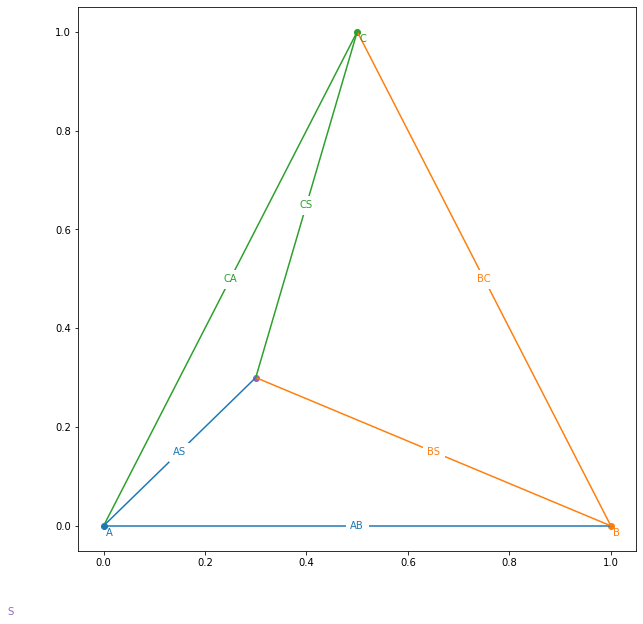
    <p>What do we mean by this? Let’s start with this diagram:</p>

    <p><img src="/assets/boids/ray-triangle-diagram.png" alt="" /></p>

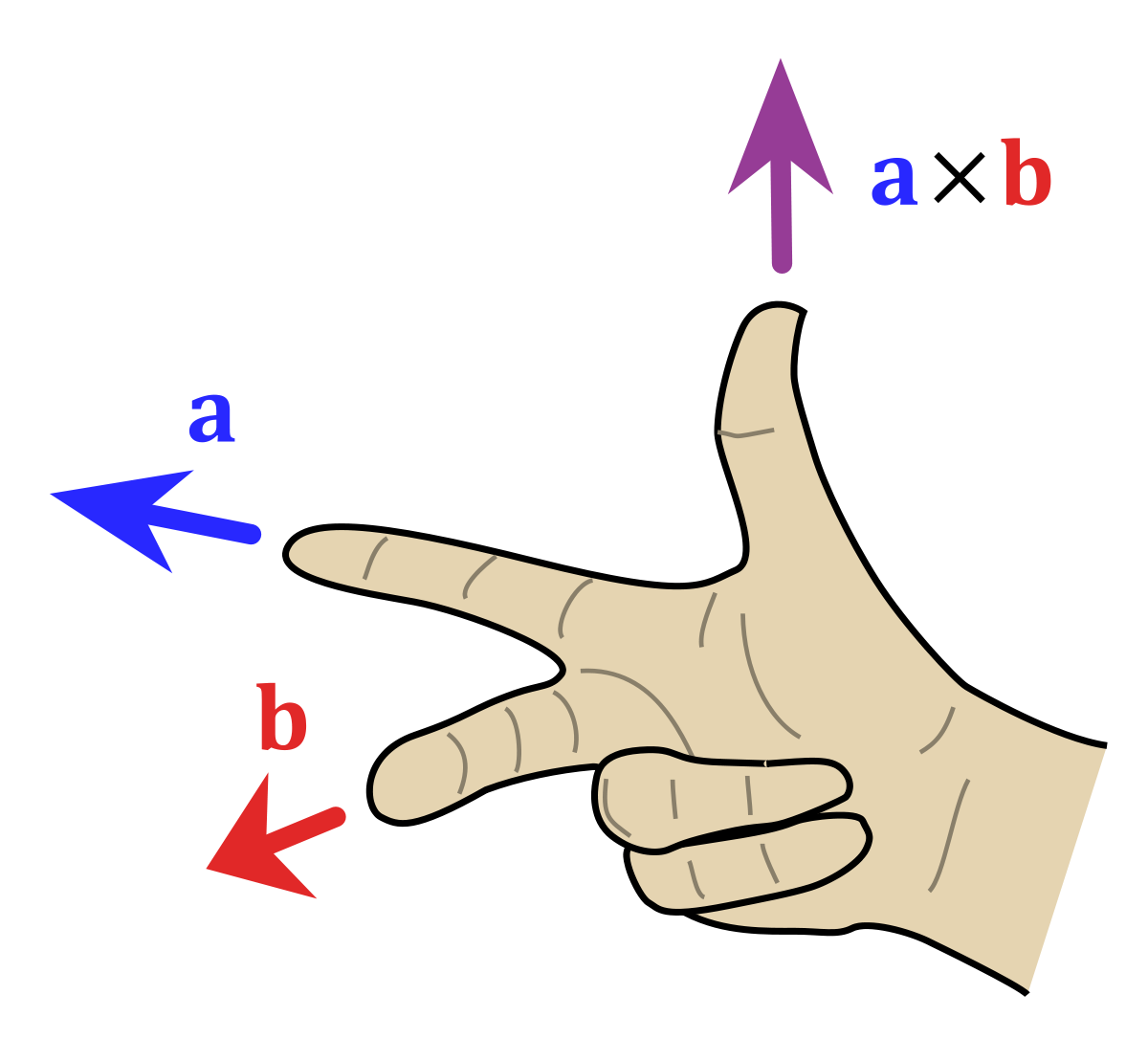
    <p>Now make your right hand into this:</p>

    <p><img src="/assets/boids/right-hand-rule.png" alt="" /></p>

    <p>If <em>AB</em> is <em>a</em> and <em>AS</em> is <em>b</em>, then your thumb points out of the triangle, the same direction as the triangle’s
normal vector. But now imagine that the point AS is below the triangle. If you do the same thing you have to flip
your hand around (no &gt; 180 degrees allowed). That means that your thumb would oppose the normal vector.</p>
  </li>
  <li>If all resultant vectors are pointing in the same direction as the normal vector, the ray intersects the triangle.</li>
</ol>

<p>The code is unbelievably simple:</p>

<div class="language-python highlighter-rouge"><div class="highlight"><pre class="highlight"><code><span class="c1"># A,B,C are triangle points
# S is the ray origin
# D is the ray direction
</span><span class="k">def</span> <span class="nf">intersects</span><span class="p">(</span><span class="n">A</span><span class="p">,</span> <span class="n">B</span><span class="p">,</span> <span class="n">C</span><span class="p">,</span> <span class="n">S</span><span class="p">,</span> <span class="n">D</span><span class="p">,</span> <span class="n">color</span><span class="o">=</span><span class="s">'red'</span><span class="p">):</span>
    <span class="c1"># N = The normal vector of the triangle
</span>    <span class="n">N</span> <span class="o">=</span> <span class="n">cross</span><span class="p">(</span><span class="n">A</span> <span class="o">-</span> <span class="n">B</span><span class="p">,</span> <span class="n">B</span> <span class="o">-</span> <span class="n">C</span><span class="p">)</span>
    <span class="n">N</span> <span class="o">/=</span> <span class="n">norm</span><span class="p">(</span><span class="n">N</span><span class="p">)</span>
    <span class="c1"># Force the normal to oppose the ray
</span>    <span class="k">if</span> <span class="p">(</span><span class="n">dot</span><span class="p">(</span><span class="n">N</span><span class="p">,</span> <span class="n">D</span><span class="p">)</span> <span class="o">&gt;</span> <span class="mi">0</span><span class="p">):</span> <span class="n">N</span> <span class="o">=</span> <span class="o">-</span><span class="n">N</span>

    <span class="c1"># t defines the length of ray needed to intersect the plane
</span>    <span class="n">t</span> <span class="o">=</span> <span class="n">dot</span><span class="p">(</span><span class="n">N</span><span class="p">,</span> <span class="n">A</span> <span class="o">-</span> <span class="n">S</span><span class="p">)</span> <span class="o">/</span> <span class="n">dot</span><span class="p">(</span><span class="n">N</span><span class="p">,</span> <span class="n">D</span><span class="p">)</span>

    <span class="c1"># dot(N, D) could be zero, remember to do a &lt;=zero check
</span>    <span class="c1"># dot(N, D) == 0 means that the ray and plane are parallel
</span>    <span class="k">if</span> <span class="p">(</span><span class="nb">abs</span><span class="p">(</span><span class="n">dot</span><span class="p">(</span><span class="n">N</span><span class="p">,</span> <span class="n">D</span><span class="p">))</span> <span class="o">&gt;</span> <span class="mf">0.001</span> <span class="ow">and</span> <span class="n">t</span> <span class="o">&gt;</span> <span class="mi">0</span><span class="p">):</span>
        <span class="n">PlanePoint</span> <span class="o">=</span> <span class="n">S</span> <span class="o">+</span> <span class="n">D</span> <span class="o">*</span> <span class="n">t</span>

        <span class="n">PN</span> <span class="o">=</span> <span class="p">[</span>
            <span class="n">cross</span><span class="p">(</span><span class="n">B</span> <span class="o">-</span> <span class="n">A</span><span class="p">,</span> <span class="n">PlanePoint</span> <span class="o">-</span> <span class="n">A</span><span class="p">),</span>
            <span class="n">cross</span><span class="p">(</span><span class="n">C</span> <span class="o">-</span> <span class="n">B</span><span class="p">,</span> <span class="n">PlanePoint</span> <span class="o">-</span> <span class="n">B</span><span class="p">),</span>
            <span class="n">cross</span><span class="p">(</span><span class="n">A</span> <span class="o">-</span> <span class="n">C</span><span class="p">,</span> <span class="n">PlanePoint</span> <span class="o">-</span> <span class="n">C</span><span class="p">)</span>
        <span class="p">]</span>

        <span class="n">PN</span> <span class="o">=</span> <span class="p">[</span><span class="n">pn</span> <span class="o">/</span> <span class="n">norm</span><span class="p">(</span><span class="n">pn</span><span class="p">)</span> <span class="k">for</span> <span class="n">pn</span> <span class="ow">in</span> <span class="n">PN</span><span class="p">]</span>

        <span class="n">intersect</span> <span class="o">=</span> <span class="nb">all</span><span class="p">([</span><span class="n">dot</span><span class="p">(</span><span class="n">pn</span><span class="p">,</span> <span class="n">N</span><span class="p">)</span> <span class="o">&gt;</span> <span class="mi">0</span> <span class="k">for</span> <span class="n">pn</span> <span class="ow">in</span> <span class="n">PN</span><span class="p">])</span>
        <span class="k">if</span> <span class="p">(</span><span class="n">intersect</span><span class="p">):</span> <span class="k">return</span> <span class="n">PlanePoint</span>
</code></pre></div></div>

<p>And here’s what it looks like in action (interactive):</p>

<embed src="/assets/boids/figures/ray-triangle.html" width="1000" height="650" />

<p>The cross-product vectors are shown at the 3 edges of the triangle (red). The ray (light-blue) from the point source 
(orange) intersects the plane formed by the triangle at the point (green). The normal vector for the triangle is shown in
dark blue.</p>

<p>Apply that to all the triangles generated from the previous voxels, and we’re in business.</p>

<h4 id="wait-turn-around">Wait… Turn around!</h4>

<p>Okay, we still have to make the fish avoid the obstacle. That is not at all trivial. I have a solution, but it isn’t
pretty…</p>

<p>Initially, I thought I could use the normal vector to steer the boid away from the terrain. That was a giant fail. Since
the geometry can be very complex, there are pockets that boids can get stuck in. I shamelessly stole Sebastian Lague’s
solution. Here’s the rundown:</p>

<ol>
  <li>Once we know we’re going to hit something, calmly panic and think about an escape route.</li>
  <li>Generate a cone of rays progressively moving further away from the velocity vector. Check if any of these rays are
occluded.</li>
  <li>The first ray to not be blocked heavily influences the boid’s velocity.</li>
</ol>

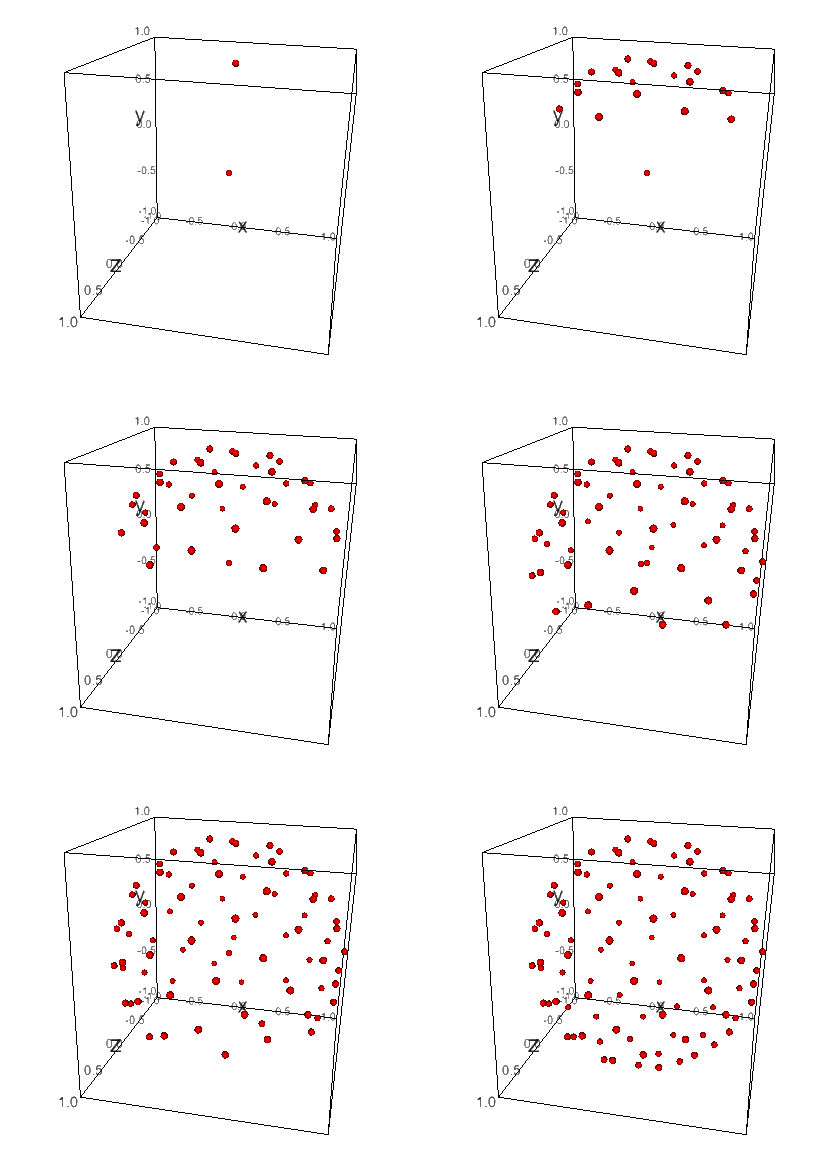
<p>These rays are straightforward to generate. Here’s the code for generating a Fibonacci spiral:</p>

<div class="language-python highlighter-rouge"><div class="highlight"><pre class="highlight"><code><span class="n">num_pts</span> <span class="o">=</span> <span class="mi">100</span>
<span class="k">for</span> <span class="n">i</span> <span class="ow">in</span> <span class="n">arange</span><span class="p">(</span><span class="mi">0</span><span class="p">,</span> <span class="n">num_pts</span><span class="p">):</span>
    <span class="n">index</span> <span class="o">=</span> <span class="n">i</span> <span class="o">+</span> <span class="mf">0.5</span>
    <span class="n">phi</span> <span class="o">=</span> <span class="n">arccos</span><span class="p">(</span><span class="mi">1</span> <span class="o">-</span> <span class="mi">2</span> <span class="o">*</span> <span class="n">index</span> <span class="o">/</span> <span class="n">num_pts</span><span class="p">)</span>
    <span class="n">theta</span> <span class="o">=</span> <span class="n">pi</span> <span class="o">*</span> <span class="p">(</span><span class="mi">1</span> <span class="o">+</span> <span class="mi">5</span> <span class="o">**</span> <span class="mf">0.5</span><span class="p">)</span> <span class="o">*</span> <span class="n">index</span>
    <span class="n">x</span><span class="p">,</span> <span class="n">y</span><span class="p">,</span> <span class="n">z</span> <span class="o">=</span> <span class="n">cos</span><span class="p">(</span><span class="n">theta</span><span class="p">)</span> <span class="o">*</span> <span class="n">sin</span><span class="p">(</span><span class="n">phi</span><span class="p">),</span> <span class="n">cos</span><span class="p">(</span><span class="n">phi</span><span class="p">),</span> <span class="o">-</span><span class="n">sin</span><span class="p">(</span><span class="n">theta</span><span class="p">)</span> <span class="o">*</span> <span class="n">sin</span><span class="p">(</span><span class="n">phi</span><span class="p">);</span>
</code></pre></div></div>

<p>Assume that the boid is facing upwards, here is the algorithm generating “alternate” paths:</p>

<p><img src="/assets/boids/fibonacci-spiral-sphere.gif" alt="" /></p>

<h4 id="integration-hell">Integration Hell</h4>

<p>As easy as all that was individually, it has to be glued together. This was in no way fun. But you all get to see more
cool videos. Here’s one that I took showing the ray, intersected voxels, triangles, and alternate paths being generated.
You might notice those green triangles look a bit off. That’s right, I wrote all of this code in C to run on the CPU, 
but the world generates on the GPU. There is a floating-point precision difference between the CPU and GPU that I did
not have fun resolving. Put simply, everything had to be rewritten in GLSL shaders.</p>

<iframe width="862" height="456" src="https://www.youtube.com/embed/3j7Tq5QjncA" title="YouTube video player" frameborder="0" allow="accelerometer; autoplay; clipboard-write; encrypted-media; gyroscope; picture-in-picture" allowfullscreen=""></iframe>

<p>Once that was all figured out, it was pretty cool:</p>

<iframe width="853" height="480" src="https://www.youtube.com/embed/syIxF1IMKuM" title="YouTube video player" frameborder="0" allow="accelerometer; autoplay; clipboard-write; encrypted-media; gyroscope; picture-in-picture" allowfullscreen=""></iframe>

<h1 id="small-improvements">Small Improvements</h1>

<h2 id="no-more-stockfish">No more stockfish</h2>

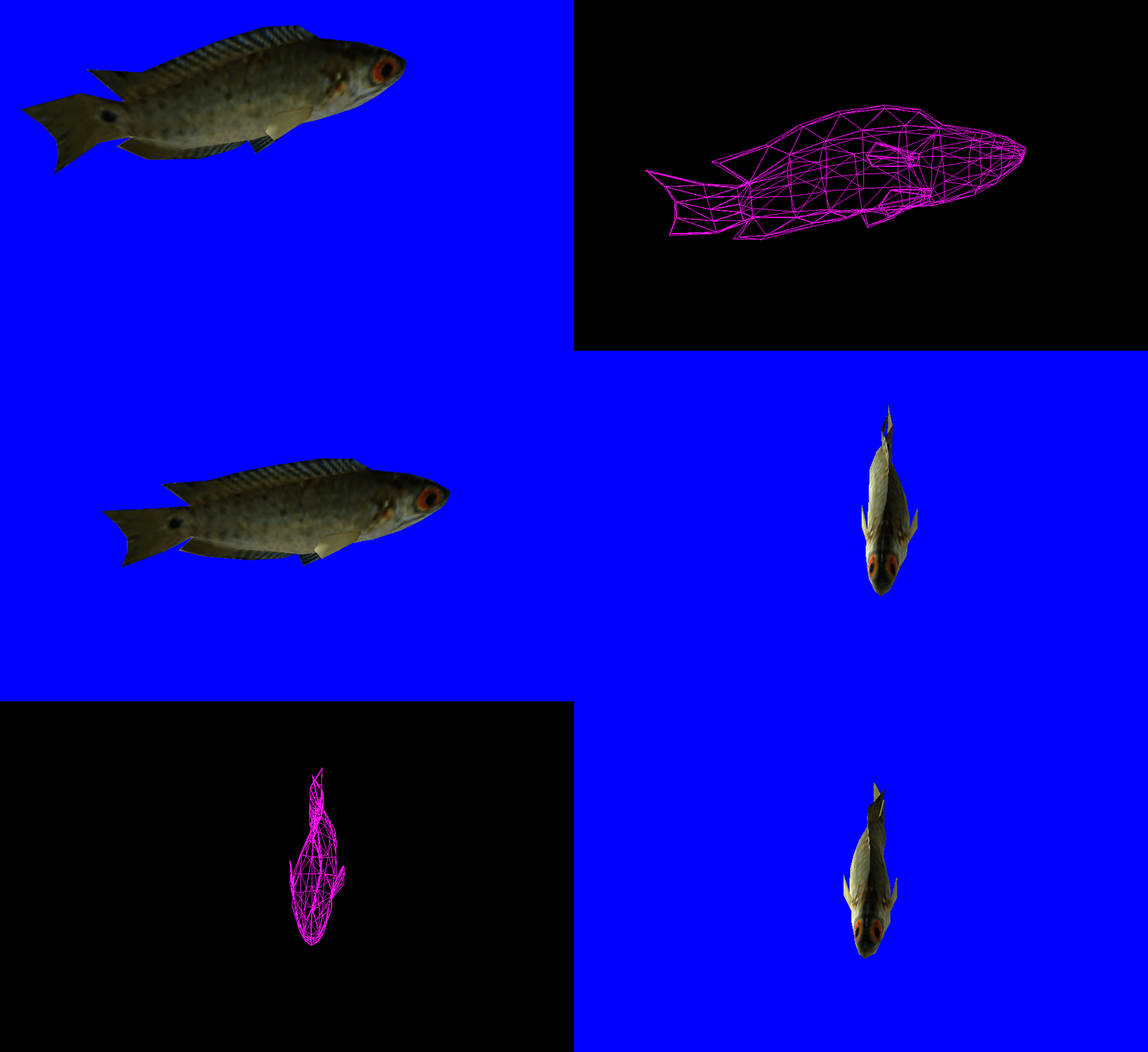
<p>Firstly, the fish aren’t well… fish-like. Let me have a go at that.</p>

<p>The easiest way to go about this is to import a pre-made fish model as an obj. Obj files, seemingly like everything else
in OpenGL, are not supported out of the box. It takes a lot of finessing to get the meshes to load properly
into shaders. One issue that I spent way too long working on was that my model used a mixture of quadrangles and
triangles for the mesh. Shaders will only accept triangles, so performing a triangulation on the mesh before importing
is a big plus.</p>

<p>Applying a simple sine-wave translation to the vertices of the model adds a sort-of wiggle that emulates how a fish
would swim:</p>

<p><img src="/assets/boids/swimming-fish.gif" alt="" /></p>

<h2 id="hide-the-world-generation">Hide the world generation</h2>

<p>If you move forward, you’ll see the world generating bit-by-bit. It’s best to cover that up. This is probably the
easiest part, just 3 equations:</p>

<script type="text/javascript" async="" src="https://cdn.mathjax.org/mathjax/latest/MathJax.js?config=TeX-MML-AM_CHTML"> </script>

\[\begin{align}
F_{\text{linear}} &amp;= 1 - \frac{\text{fog end}-d}{\text{fog end} - \text{fog start}}
\\
F_{\text{exp}} &amp;= {e^{-(d * \text{fog density})}}
\\
F_{\text{exp2}} &amp;= {e^{-(d * \text{fog density})^2}}
\\
\text{Pixel Color} &amp;= \text{mix}(\text{color}, \text{fog color}, F_{\text{linear}} + F_{\text{exp}} + F_{\text{exp2}})
\end{align}\]

<h2 id="caustics">Caustics</h2>

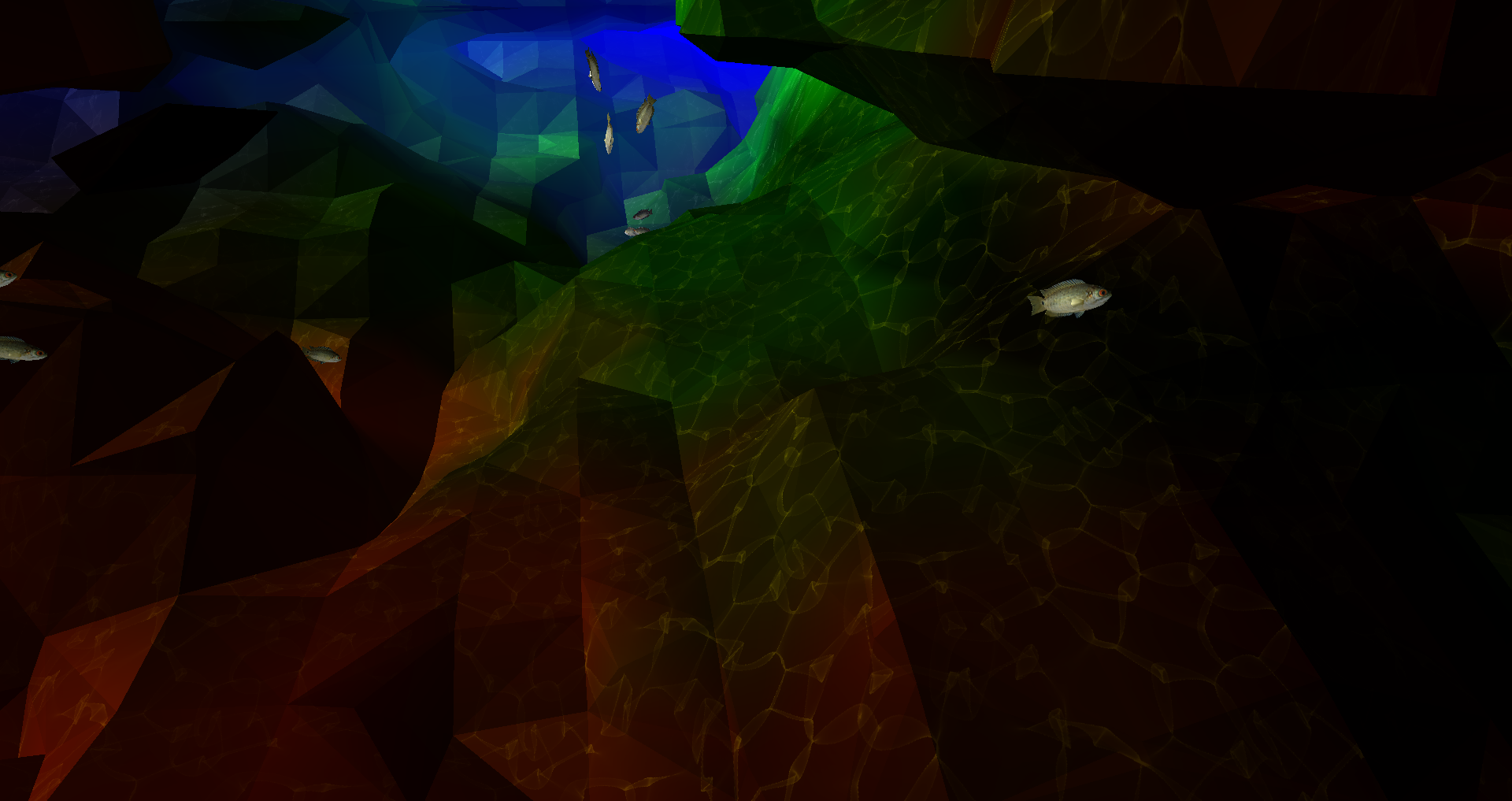
<p>A <a href="https://en.wikipedia.org/wiki/Caustic_(optics)">caustic</a> is a pattern of (often white) light resulting from
refraction or reflection. In the ocean, this can be seen as a wavy pattern on the seafloor. These are incredibly
difficult to generate in real-time over such a large scene. For that reason, I cheated. I
used https://www.dualheights.se/caustics/ to generate a sequence of 64 tileable caustic images that I project directly
downward onto the seafloor. To be frank, it’s dirty and only looks good from far away. I’m mixed, but I’ll keep it here
for now.</p>

<p><img src="/assets/boids/caustics-final.png" alt="" /></p>

<h2 id="ambient-occlusion">Ambient Occlusion</h2>

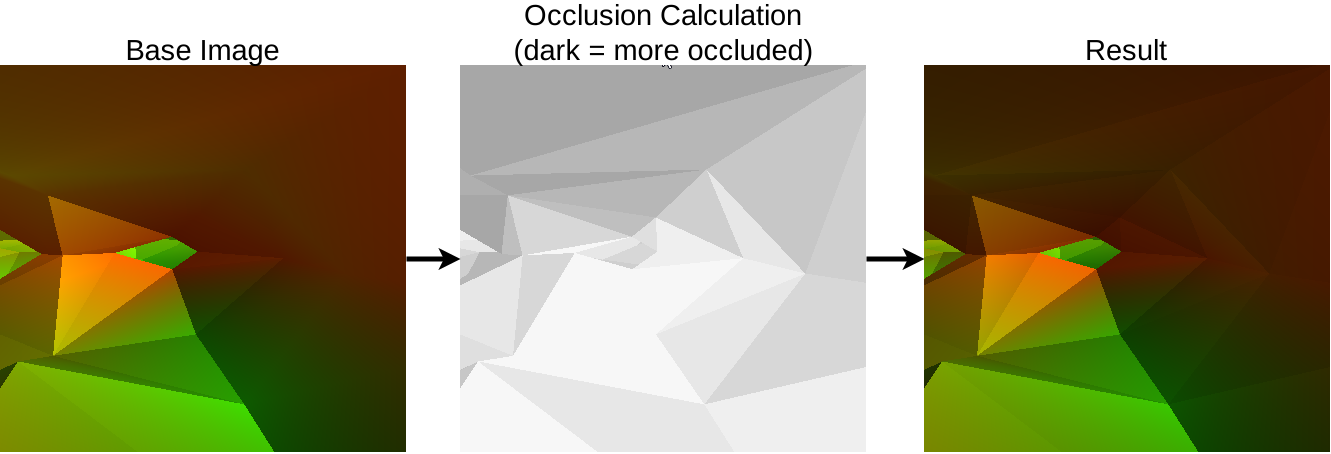
<p>Ambient Occlusion refers to how a point is exposed to ambient light in a scene. So if we have a point underground, it
probably isn’t going to be very bright. You may have noticed that caves are awfully bright in my hyper-realistic scene, 
so a change might be warranted.</p>

<p>To calculate a lighting value for each point, I took the following
from <a href="https://developer.nvidia.com/gpugems/gpugems3/part-i-geometry/chapter-1-generating-complex-procedural-terrains-using-gpu">GPU Gems 3</a>:</p>

<blockquote>
  <p>To compute an ambient occlusion value for a point in space, we cast out 32 rays. A constant Poisson distribution of
points on the surface of a sphere works well for this. We store these points in a constant buffer. We can—and
should—reuse the same set of rays over and over for each vertex for which we want ambient occlusion.</p>
</blockquote>

<p>In human-speak, check your nearby surroundings to see if there’s a lot of nearby geometry. Adjust lighting proportional
to the number of neighbors.</p>

<p><img src="/assets/boids/occlusion.svg" alt="" /></p>

<h1 id="the-final-result">The Final Result</h1>

<p>So after all of that, and a lot more put together, we have a finished scene. This was one of my all-time most
favorite and hated projects. I hope you all enjoyed it. Here’s a final demo:</p>

<iframe width="853" height="480" src="https://www.youtube.com/embed/4Djj40vwHjo" title="YouTube video player" frameborder="0" allow="accelerometer; autoplay; clipboard-write; encrypted-media; gyroscope; picture-in-picture" allowfullscreen=""></iframe>

<div class="github-card" data-github="kylepls/boids" data-width="400" data-height="150" data-theme="default"></div>
<script src="//cdn.jsdelivr.net/github-cards/latest/widget.js"></script>]]></content><author><name></name></author><summary type="html"><![CDATA[Table of Contents]]></summary></entry><entry><title type="html">A Fast Pen Plotter</title><link href="http://kylepls.com/plot" rel="alternate" type="text/html" title="A Fast Pen Plotter" /><published>2020-01-17T03:26:42+00:00</published><updated>2020-01-17T03:26:42+00:00</updated><id>http://kylepls.com/a-fast-pen-plotter</id><content type="html" xml:base="http://kylepls.com/plot"><![CDATA[<h2 id="table-of-contents">Table of Contents</h2>

<ul class="no_toc" id="markdown-toc">
  <li><a href="#table-of-contents" id="markdown-toc-table-of-contents">Table of Contents</a></li>
  <li><a href="#introduction" id="markdown-toc-introduction">Introduction</a></li>
  <li><a href="#principles" id="markdown-toc-principles">Principles</a>    <ul>
      <li><a href="#kinematics" id="markdown-toc-kinematics">Kinematics</a></li>
      <li><a href="#electronics" id="markdown-toc-electronics">Electronics</a></li>
      <li><a href="#drawing" id="markdown-toc-drawing">Drawing</a></li>
    </ul>
  </li>
  <li><a href="#designing" id="markdown-toc-designing">Designing</a>    <ul>
      <li><a href="#z-axis-simplification" id="markdown-toc-z-axis-simplification">Z-Axis Simplification</a></li>
      <li><a href="#electronics-1" id="markdown-toc-electronics-1">Electronics</a></li>
    </ul>
  </li>
  <li><a href="#assembly" id="markdown-toc-assembly">Assembly</a>    <ul>
      <li><a href="#initial-kinematics-tests" id="markdown-toc-initial-kinematics-tests">Initial Kinematics Tests</a></li>
      <li><a href="#refined-kinematics-tests" id="markdown-toc-refined-kinematics-tests">Refined Kinematics Tests</a></li>
      <li><a href="#first-drawing-test" id="markdown-toc-first-drawing-test">First Drawing Test</a></li>
    </ul>
  </li>
  <li><a href="#final-product" id="markdown-toc-final-product">Final Product</a>    <ul>
      <li><a href="#drawings" id="markdown-toc-drawings">Drawing(s)</a></li>
      <li><a href="#model" id="markdown-toc-model">Model</a></li>
    </ul>
  </li>
  <li><a href="#conclusion" id="markdown-toc-conclusion">Conclusion</a></li>
</ul>

<h2 id="introduction">Introduction</h2>

<p>Pen plotters are extremely simple machines by nature. Most commonly, two axes are manipulated to move a print
head to a desired location on a flat surface. Below is a quick example:</p>

<iframe width="640" height="480" src="https://www.youtube.com/embed/1J9GBEQs-Cg" frameborder="0" allow="accelerometer; autoplay; clipboard-write; encrypted-media; gyroscope; picture-in-picture" allowfullscreen=""></iframe>

<p>Pretty neat, right?</p>

<hr />

<h2 id="principles">Principles</h2>

<h3 id="kinematics">Kinematics</h3>

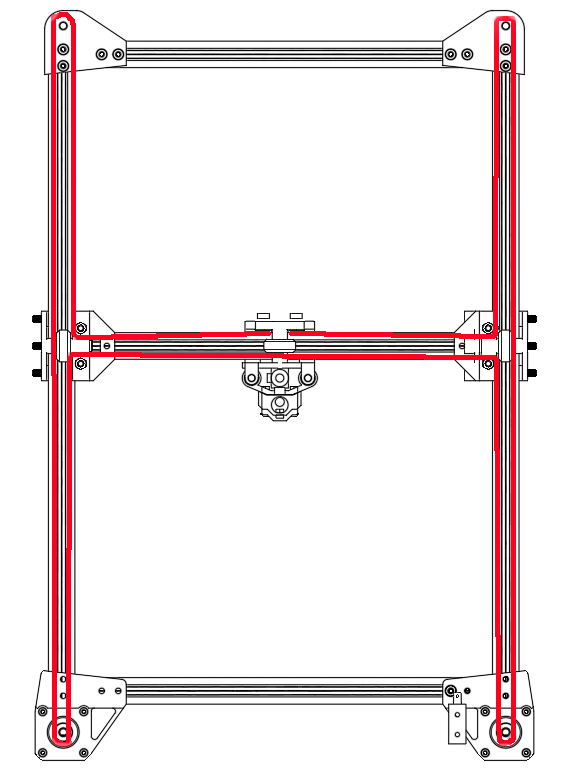
<p>One thing you may have noticed in the above video is that there’s no clear mechanism for moving the ‘print head’ around
the coordinate system. It’s all contained internally within the segments of extrusion. This creates a very clean look and is
quite uncommon.</p>

<p>The mechanism in question is commonly referred to as ‘H-Bot.’ This should not be confused with a more popular kinematics
option called ‘CoreXY,’ which is a prevalent design choice among 3D printers.</p>

<p>The main principle between both of these options is that there is a continuous section of belt running throughout the
extruded segments that terminates on each opposing side of the print head. Then, through clever manipulation of the
motors, the print head can be maneuvered throughout the plane without directly mounting a motor along the y-axis.</p>

<p><img src="/assets/plot/hbot belt.jpg" alt="hbot belt.jpg" /></p>

<h3 id="electronics">Electronics</h3>

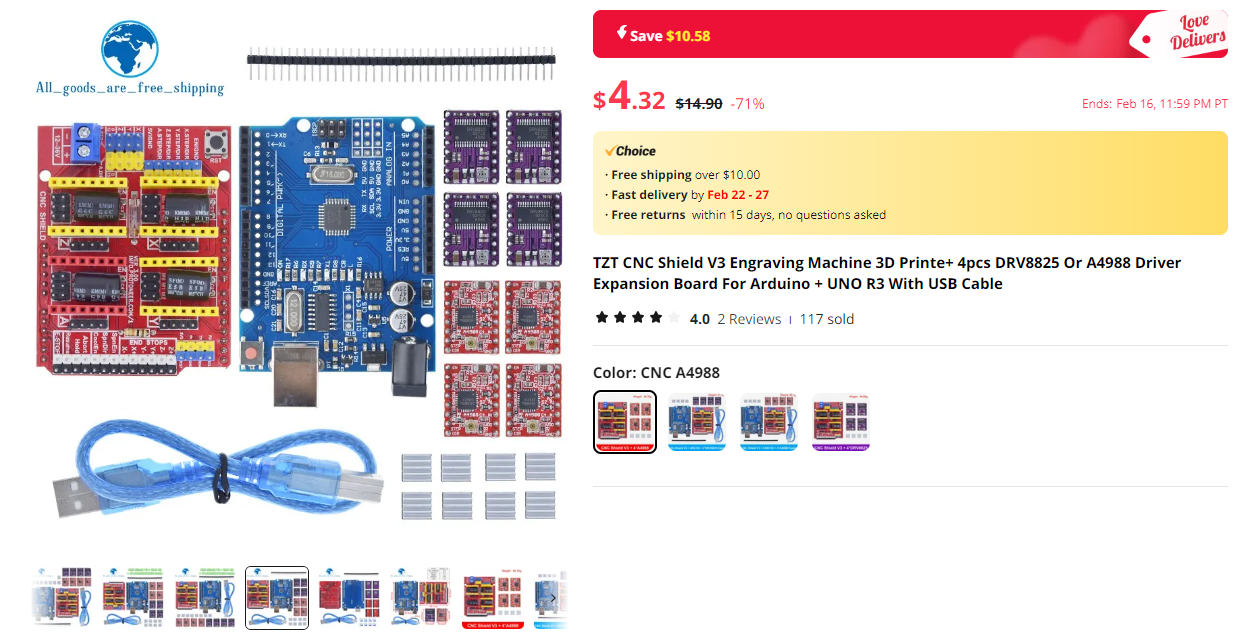
<p>The electronics aspect is essentially a solved problem. Extremely cheap Arduino hats are available for this
exact purpose.</p>

<p><img src="/assets/plot/cnc shield.png" alt="cnc shield.png" /></p>

<p>These boards are slightly different from what might be used in a 3D printer in a somewhat agitating way. The main
distinction is that these boards expect CNC-flavored G-Code.</p>

<h3 id="drawing">Drawing</h3>

<p>Drawing is, hopefully, a simple task. The reference design at the top uses a solenoid to force a pen or marker into the
work surface. The benefit of this approach is that no intricate mechanisms are needed on the Z-Axis. An on/off (drawing or not
drawing) level of granularity is sufficient.</p>

<h2 id="designing">Designing</h2>

<p>It pains me to say this, but I skipped documenting a lot of the design process for this project. In place of that, I do
have a few highlights which I found interesting.</p>

<h3 id="z-axis-simplification">Z-Axis Simplification</h3>


<p>I originally designed the Z-Axis to have 4 grooved bearings riding within a small groove. This mechanism proved to be
completely unstable and failed to fully constrain the motion of the pen. It’s easy to overlook the small forces at play, but
the multiplication of these forces by the lever of the pen dragging on the work surface made a redesign unavoidable.</p>

<p><img src="/assets/plot/z-grooved.webp" alt="z-grooved.webp" /></p>


<p>My next attempt replaced the grooved tracks with 2 linear rails:</p>

<p><img src="/assets/plot/z-new-small.webp" alt="z-new-small.webp" /></p>

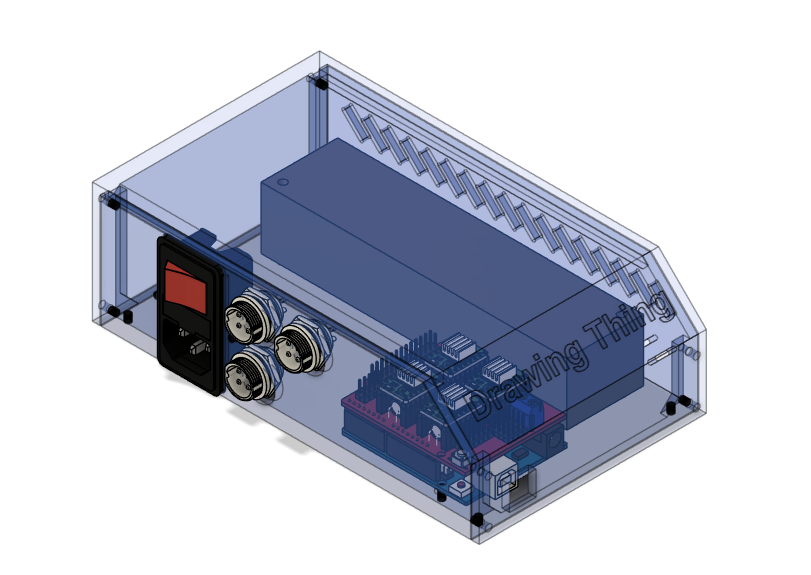
<h3 id="electronics-1">Electronics</h3>

<p>It’s never fun to have your electronics spilling out onto your work surface, so I designed a nice little enclosure to
keep things tidy:</p>

<p><img src="/assets/plot/Fusion360_JKv06Ig9bR.png" alt="Fusion360_JKv06Ig9bR.png" /></p>

<h2 id="assembly">Assembly</h2>

<p>This phase went pretty smoothly since there isn’t a great number of complexities. I’ll use this section to share a few
milestones.</p>

<h3 id="initial-kinematics-tests">Initial Kinematics Tests</h3>

<iframe width="640" height="480" src="https://www.youtube.com/embed/amp2tnHdX-w" frameborder="0" allow="accelerometer; autoplay; clipboard-write; encrypted-media; gyroscope; picture-in-picture" allowfullscreen=""></iframe>

<h3 id="refined-kinematics-tests">Refined Kinematics Tests</h3>

<iframe width="640" height="480" src="https://youtube.com/embed/hMdBO44GtNY?feature=share" frameborder="0" allow="accelerometer; autoplay; clipboard-write; encrypted-media; gyroscope; picture-in-picture" allowfullscreen=""></iframe>

<h3 id="first-drawing-test">First Drawing Test</h3>

<p>This test is interesting. You’ll notice that the print head isn’t doing anything. That’s because the mount
connecting the z-axis motion to the solenoid melted mid-print. This part was initially printed in PLA, which will
lose a great deal of its strength when exposed to heat. Reprinting this part in PETG significantly raised the temperatures it could
withstand.</p>

<iframe width="640" height="480" src="https://youtube.com/embed/5FcG3O_ksYY?feature=share" frameborder="0" allow="accelerometer; autoplay; clipboard-write; encrypted-media; gyroscope; picture-in-picture" allowfullscreen=""></iframe>

<h2 id="final-product">Final Product</h2>

<p>Here’s the final product. To preempt the obvious, the camera work is substandard—hopefully I can reshoot this in the
future.</p>

<iframe width="640" height="480" src="https://youtube.com/embed/B5u0XMftVsU" frameborder="0" allow="accelerometer; autoplay; clipboard-write; encrypted-media; gyroscope; picture-in-picture" allowfullscreen=""></iframe>

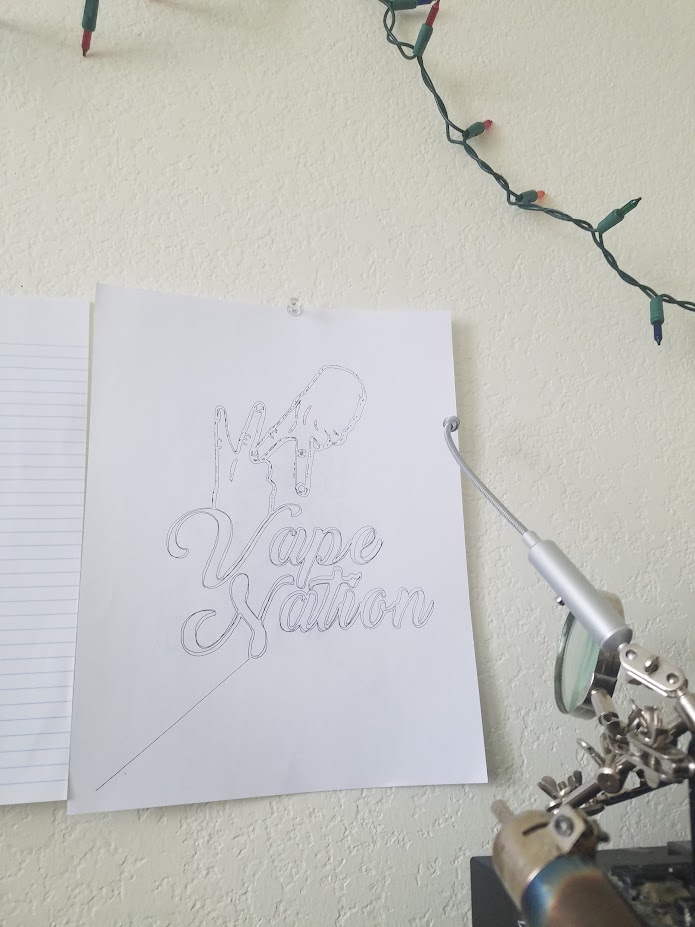
<h3 id="drawings">Drawing(s)</h3>

<p>I didn’t get the time to capture too many drawings made on this machine, but here is one of my favorites:</p>

<p><img src="/assets/plot/20190308_113303.jpg" alt="20190308_113303.jpg" /></p>

<p>There’s still some room to improve (emphasized by the first travel move not properly retracting the print head), but it’s
not <em>that bad</em>.</p>

<h3 id="model">Model</h3>

<iframe src="https://myhub.autodesk360.com/ue28516fe/shares/public/SHd38bfQT1fb47330c9968da80be845606a5?mode=embed" width="1024" height="768" allowfullscreen="true" webkitallowfullscreen="true" mozallowfullscreen="true" frameborder="0"></iframe>

<h2 id="conclusion">Conclusion</h2>

<p>Well… that’s it. I don’t think this machine is going to win any awards, but it definitely tops my jury-rigged pen
plotter made about 2 years earlier on my first 3D printer:</p>

<iframe width="640" height="480" src="https://youtube.com/embed/lEhFwlNUk3M?feature=share" frameborder="0" allow="accelerometer; autoplay; clipboard-write; encrypted-media; gyroscope; picture-in-picture" allowfullscreen=""></iframe>

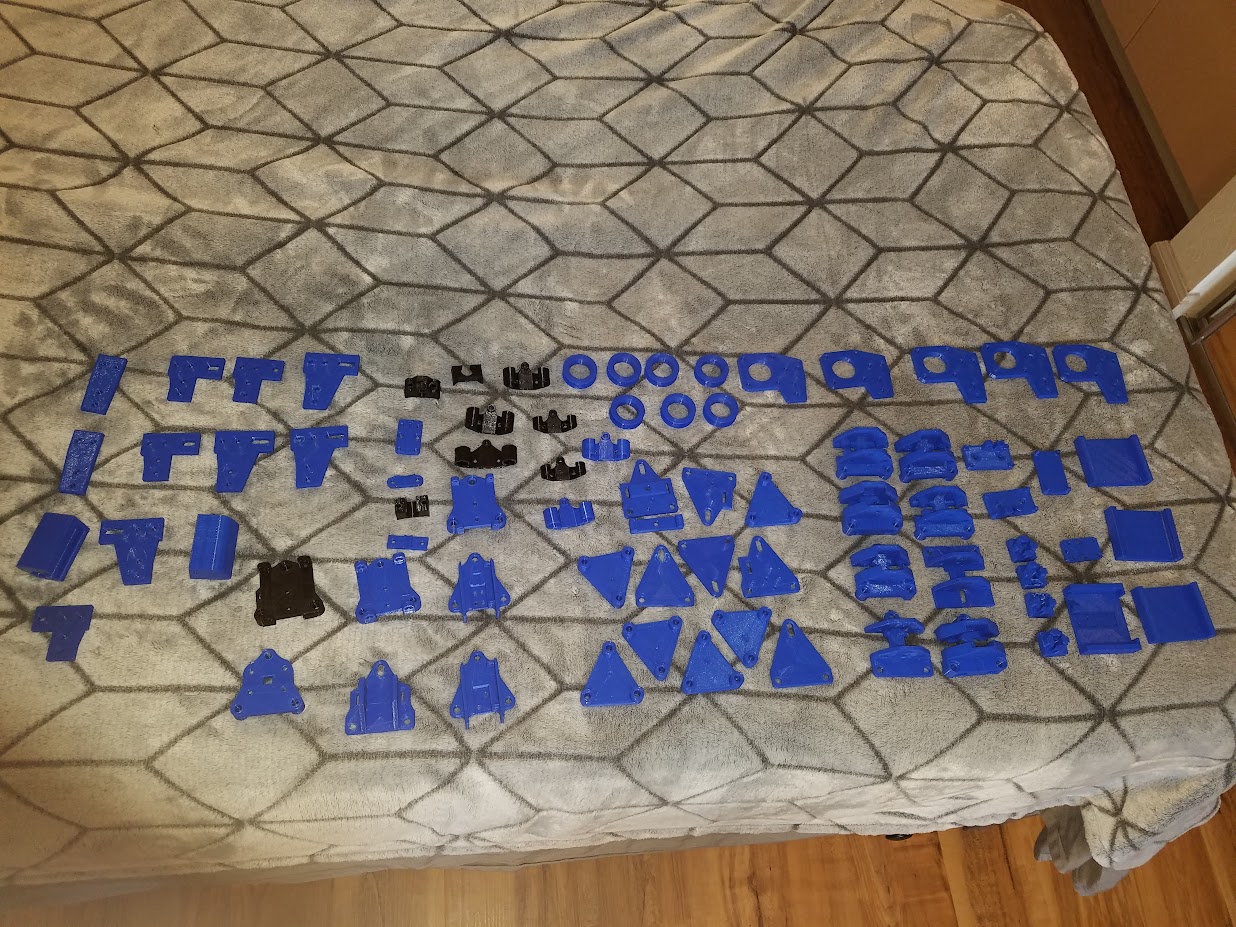
<p>I’ll end with my favorite picture of the entire project. It’s near-impossible to do something perfectly on your first
try. I certainly attempted to but fell well short of this <em>ideal</em>. A lot of the parts had to be re-printed and
re-designed several times before they would even fit together. Below is an image of all the parts that didn’t make it
into the machine.</p>

<p><img src="/assets/plot/all parts.jpg" alt="all parts.jpg" /></p>]]></content><author><name></name></author><summary type="html"><![CDATA[Table of Contents]]></summary></entry><entry><title type="html">Fully Autonomous YouTube Channel</title><link href="http://kylepls.com/youtube" rel="alternate" type="text/html" title="Fully Autonomous YouTube Channel" /><published>2019-09-18T00:00:00+00:00</published><updated>2019-09-18T00:00:00+00:00</updated><id>http://kylepls.com/youtube</id><content type="html" xml:base="http://kylepls.com/youtube"><![CDATA[<script type="text/javascript" async="" src="https://cdn.mathjax.org/mathjax/latest/MathJax.js?config=TeX-MML-AM_CHTML"></script>

<p>Lately I’ve noticed a lot of similar YouTube channels popping up in my feed.
I could go on at length trying to describe
this format to you, or I could just give you an example.
I think the latter would be easiest:</p>

<div align="center">
    <iframe width="560" height="315" src="https://www.youtube.com/embed/4qtKCQfp4KI" frameborder="0" allow="accelerometer; autoplay; encrypted-media; gyroscope; picture-in-picture" allowfullscreen=""></iframe>
</div>

<p>That video specifically has 19k views at the time of writing this. And there’s more like it, just type “Reddit” into the
YouTube search bar:</p>

<p><img src="/assets/youtube/reddit-youtube-videos.png" alt="" /></p>

<p>Every single one of these videos, literally all of them, are of almost the exact same format. It looks something like
this:</p>

<ul>
  <li>The video title is usually of the form: <thread> <subreddit> &lt;channel name/series name&gt;</subreddit></thread></li>
  <li>The thumbnail includes the subreddit icon along with the name of the subreddit.</li>
  <li>Sometimes the awards for the post are shown next to the subreddit name in the thumbnail.</li>
  <li>In the thumbnail, the title of the thread takes up the entire vertical and about 2/3 of the horizontal space.
The text usually has different highlighting methods to make certain words stand out. (The green text in the example
video).</li>
  <li>An image related to the name of the post is on the right-hand side of the thread title.</li>
  <li>Each video has a TTS engine that reads out the text of the thread title/comment.</li>
  <li>While the text is being read, the text of the comment is incrementally revealed, usually one sentence at a time. Sort
of like when you read with your finger except the video does it for you.</li>
  <li>A transition is added between each comment. Usually some sort of TV static.</li>
  <li>Intros/Outros are sometimes added.</li>
  <li>Sometimes background music is added.</li>
</ul>

<p>None of those steps exercise any use of creativity. That makes it the perfect process to automate.</p>

<h6 id="i-decided-that-javaspring-would-be-a-great-combo-for-this-project-so-expect-lots-of-java-from-here-on-out">I decided that Java/<a href="https://spring.io/" title="Spring">Spring</a> would be a great combo for this project. So expect lots of Java from here on out.</h6>

<hr />

<p>Here was my original plan:</p>

<ol>
  <li>Scrape Reddit for the top posts of the day.</li>
  <li>Use some library to take images of the text sentence by sentence.</li>
  <li>Generate TTS for those comments.</li>
  <li>Drop the images and TTS into some timeline-based rendering API</li>
  <li>Spit out a video</li>
  <li>Profit?</li>
</ol>

<h3 id="scraping-reddit">Scraping Reddit</h3>

<p>This is straight forward. Reddit offers a <a href="https://www.reddit.com/dev/api/" title="Reddit API">public API</a>.</p>

<p>All that has to be done is to call <code class="highlighter-rouge">https://reddit.com/r/&lt;subreddit&gt;/top.json</code> and you get all the top threads for a
subreddit. My target for this project is <a href="https://www.reddit.com/r/AskReddit" title="/r/AskReddit">/r/AskReddit</a>.</p>

<p>Then once you have a <code class="highlighter-rouge">threadId</code> just call <code class="highlighter-rouge">https://reddit.com/comments/&lt;thread id&gt;/top.json</code> to get the top comments.</p>

<p>That’s it.</p>

<h3 id="generating-images">Generating Images</h3>

<p>Scraping Reddit wasn’t so bad, no way images could be that hard… <strong>WRONG!!!</strong> I would estimate that around 50–70% of
the time spent working on this project went towards image generation. I wouldn’t have expected it, but rendering HTML to pictures appears to be surprisingly uncommon.</p>

<p>The first part of the generation is straightforward. The text of the comment has to be broken up into sentences and each
sentence needs its own image. Then the images can be strung together to make something like this:</p>

<p><img src="/assets/youtube/incremental-imager.gif" alt="" /></p>

<p>I had many ideas on how to go about this:</p>

<ul>
  <li>Draw the text/image using <code class="highlighter-rouge">java.awt.Graphics</code>.</li>
  <li>Render locally generated HTML snippets.</li>
  <li>Take a screenshot from Reddit.com and add the text in part-by-part.</li>
</ul>

<p>As an exercise to the reader, try to guess which methods worked and which didn’t. I tried all of them and only one kind
of worked.</p>

<h4 id="method-1-javaawtgraphics">Method 1: java.awt.Graphics</h4>

<p>How patient are you? Chances are, you do not have the patience required to implement this. Drawing such a simple image
is a burden in awt. Even just drawing text that doesn’t look horrible requires the following blob of code:</p>

<div class="language-java highlighter-rouge"><div class="highlight"><pre class="highlight"><code><span class="c1">// Load the font</span>
<span class="nc">GraphicsEnvironment</span> <span class="n">ge</span> <span class="o">=</span> <span class="nc">GraphicsEnvironment</span><span class="o">.</span><span class="na">getLocalGraphicsEnvironment</span><span class="o">();</span>
<span class="nc">Font</span> <span class="n">font</span> <span class="o">=</span> <span class="nc">Font</span><span class="o">.</span><span class="na">createFont</span><span class="o">(</span><span class="nc">Font</span><span class="o">.</span><span class="na">TRUETYPE_FONT</span><span class="o">,</span> <span class="n">fontFile</span><span class="o">);</span>
<span class="n">ge</span><span class="o">.</span><span class="na">registerFont</span><span class="o">(</span><span class="n">font</span><span class="o">);</span>

<span class="c1">// Turn on text anti-aliasing</span>
<span class="n">graphics</span><span class="o">.</span><span class="na">setRenderingHint</span><span class="o">(</span>
        <span class="nc">RenderingHints</span><span class="o">.</span><span class="na">KEY_TEXT_ANTIALIASING</span><span class="o">,</span>
        <span class="nc">RenderingHints</span><span class="o">.</span><span class="na">VALUE_TEXT_ANTIALIAS_GASP</span><span class="o">);</span>
<span class="n">graphics</span><span class="o">.</span><span class="na">setRenderingHint</span><span class="o">(</span>
        <span class="nc">RenderingHints</span><span class="o">.</span><span class="na">KEY_FRACTIONALMETRICS</span><span class="o">,</span>
        <span class="nc">RenderingHints</span><span class="o">.</span><span class="na">VALUE_FRACTIONALMETRICS_ON</span><span class="o">);</span>

<span class="c1">// Set the font size</span>
<span class="nc">Font</span> <span class="n">newFont</span> <span class="o">=</span> <span class="n">font</span><span class="o">.</span><span class="na">deriveFont</span><span class="o">(</span><span class="n">font</span><span class="o">.</span><span class="na">getStyle</span><span class="o">(),</span> <span class="n">fontSize</span><span class="o">);</span>
<span class="n">graphics</span><span class="o">.</span><span class="na">setFont</span><span class="o">(</span><span class="n">newFont</span><span class="o">);</span>

<span class="c1">// Draw the string at x,y</span>
<span class="n">graphics</span><span class="o">.</span><span class="na">drawString</span><span class="o">(</span><span class="n">text</span><span class="o">,</span> <span class="n">x</span><span class="o">,</span> <span class="n">y</span> <span class="o">+</span><span class="n">g</span><span class="o">.</span><span class="na">getFontMetrics</span><span class="o">().</span>

<span class="n">getAscent</span><span class="o">());</span>
</code></pre></div></div>

<p>And that was just to draw a single string. Yeah, AWT is tedious. I don’t have the patience to redo HTML in awt so on to
the next idea.</p>

<h4 id="method-2-rendering-html-locally">Method 2: Rendering HTML locally</h4>

<p>This was actually the first method I tried because it looks straight forward. You extract the styled HTML from Reddit,
add in some placeholders, and render it.</p>

<p>Extracting the HTML is made straightforward by some amazing tools:</p>

<div class="github-card" data-github="kdzwinel/SnappySnippet" data-width="400" data-height="150" data-theme="default"></div>
<script src="//cdn.jsdelivr.net/github-cards/latest/widget.js"></script>

<p>The created snippet can be then exported to CodePen, jsFiddle or JS Bin with one click.</p>

<p>I did notice some issues with non-escaped unicode in CSS properties not being encoded properly. Instead
of <code class="highlighter-rouge">content: "\uF100"</code> it would be <code class="highlighter-rouge">content: '"□"'</code>. So after a bit of post-processing, the file is good to go.</p>

<p>So HTML extraction is complete. Then some placeholders are added into the HTML file. Then all that’s left is to render
it.</p>

<p>Q: What could go wrong?<br />
A: <strong>EVERYTHING</strong></p>

<p>The only Java API I could find that claimed to render HTML
was <a href="https://github.com/flyingsaucerproject/flyingsaucer" title="Github">flyingsaucer</a>. This library didn’t claim to work with
CSS3, but I tried it anyway. The results were completely unusable.</p>

<p>But what about Chrome? I render hundreds of HTML pages a day with Chrome. How about I give that a try.</p>

<p>Chrome offers some appealing features in its CLI mode. It can be run in headless mode, meaning no visible browser window
is opened, and it can screenshot a web-page. The only problem is that I don’t want the whole web-page, just the element
I’m trying to render. So Chrome CLI is a no-go.</p>

<h4 id="method-3-screenshotting-the-page">Method 3: Screenshotting the page</h4>

<p>This is very similar to the approach at the end of method 2 except I’ve added on some more tooling. I probably could
have gotten method 2 working, but I liked how this approach doesn’t require me to fix unicode literals every time Reddit
does a redesign.</p>

<p>The idea here is as simple as it gets: Go to the comment URL. Empty the text of the comment. Add in a sentence.
Screenshot the DOM element. Repeat.</p>

<p>To screenshot individual elements on the page, I used <a href="https://github.com/GoogleChrome/puppeteer" title="Github">puppeteer</a>. In
their own words: “Puppeteer is a Node library which provides a high-level API to control Chrome or Chromium over
the <a href="https://chromedevtools.github.io/devtools-protocol/">DevTools Protocol</a>. Puppeteer
runs <a href="https://developers.google.com/web/updates/2017/04/headless-chrome">headless</a> by default, but can be configured to
run full (non-headless) Chrome or Chromium.”</p>

<p>So it can control Chrome. But most importantly, it can “generate screenshots and PDFs of [DOM elements on] pages.”</p>

<p>To run Puppeteer, a separate Node.js application is required :(. This just needs to take in the link to the element and
take a picture of it.</p>

<p>The essence of this application is summed up in the following bits of code:</p>

<p>Taking a screenshot:</p>

<div class="language-typescript highlighter-rouge"><div class="highlight"><pre class="highlight"><code><span class="c1">// Get a box around the element that will be screenshotted</span>
<span class="kd">const</span> <span class="nx">boundingBox</span><span class="p">:</span> <span class="nx">BoundingBox</span> <span class="o">=</span> <span class="k">await</span> <span class="k">this</span><span class="p">.</span><span class="nx">page</span><span class="p">.</span><span class="nx">evaluate</span><span class="p">(</span><span class="nx">selector</span> <span class="o">=&gt;</span> <span class="p">{</span>
    <span class="kd">const</span> <span class="nx">element</span> <span class="o">=</span> <span class="nb">document</span><span class="p">.</span><span class="nx">querySelector</span><span class="p">(</span><span class="nx">selector</span><span class="p">);</span>
    <span class="p">...</span>
    <span class="kd">const</span> <span class="p">{</span><span class="nx">x</span><span class="p">,</span> <span class="nx">y</span><span class="p">,</span> <span class="nx">width</span><span class="p">,</span> <span class="nx">height</span><span class="p">}</span> <span class="o">=</span> <span class="nx">element</span><span class="p">.</span><span class="nx">parentElement</span><span class="p">.</span><span class="nx">getBoundingClientRect</span><span class="p">();</span>
<span class="p">},</span> <span class="nx">parentSelector</span><span class="p">);</span>

<span class="p">...</span> <span class="nx">add</span> <span class="nx">boundingBox</span> <span class="nx">to</span> <span class="nx">screenshotOptions</span>

<span class="kd">const</span> <span class="nx">b64string</span> <span class="o">=</span> <span class="k">await</span> <span class="k">this</span><span class="p">.</span><span class="nx">page</span><span class="p">.</span><span class="nx">screenshot</span><span class="p">(</span><span class="nx">screenshotOptions</span><span class="p">);</span>
</code></pre></div></div>

<p>Taking the incremental screenshots:</p>

<div class="language-typescript highlighter-rouge"><div class="highlight"><pre class="highlight"><code><span class="kd">const</span> <span class="nx">textHeader</span> <span class="o">=</span> <span class="k">await</span> <span class="k">this</span><span class="p">.</span><span class="nx">page</span><span class="p">.</span><span class="nx">$</span><span class="p">(</span><span class="nx">textSelector</span><span class="p">)</span>
<span class="kd">const</span> <span class="nx">textDiv</span> <span class="o">=</span> <span class="p">(</span><span class="k">await</span> <span class="nx">textHeader</span><span class="p">.</span><span class="nx">$x</span><span class="p">(</span><span class="dl">"</span><span class="s2">..</span><span class="dl">"</span><span class="p">))[</span><span class="mi">0</span><span class="p">]</span>

<span class="c1">// Split by sentence</span>
<span class="kd">const</span> <span class="nx">parts</span><span class="p">:</span> <span class="kr">string</span><span class="p">[]</span>
<span class="o">=</span> <span class="nx">splitString</span><span class="p">(</span><span class="k">await</span> <span class="k">this</span><span class="p">.</span><span class="nx">getHtml</span><span class="p">(</span><span class="nx">textDiv</span><span class="p">))</span>

<span class="c1">// Set text to ""</span>
<span class="k">await</span> <span class="k">this</span><span class="p">.</span><span class="nx">page</span><span class="p">.</span><span class="nx">evaluate</span><span class="p">(</span><span class="nx">e</span> <span class="o">=&gt;</span> <span class="nx">e</span><span class="p">.</span><span class="nx">innerHTML</span> <span class="o">=</span> <span class="dl">""</span><span class="p">,</span> <span class="nx">textDiv</span><span class="p">)</span>

<span class="c1">// Add in text part by part</span>
<span class="k">for</span> <span class="p">(</span><span class="kd">const</span> <span class="nx">part</span> <span class="k">of</span> <span class="nx">parts</span><span class="p">)</span> <span class="p">{</span>
    <span class="k">await</span> <span class="k">this</span><span class="p">.</span><span class="nx">page</span><span class="p">.</span><span class="nx">evaluate</span><span class="p">(</span>
        <span class="p">(</span><span class="nx">e</span><span class="p">,</span> <span class="nx">part</span><span class="p">)</span> <span class="o">=&gt;</span> <span class="nx">e</span><span class="p">.</span><span class="nx">innerHTML</span> <span class="o">=</span> <span class="nx">e</span><span class="p">.</span><span class="nx">innerHTML</span> <span class="o">+</span> <span class="nx">part</span><span class="p">,</span> <span class="nx">textDiv</span><span class="p">,</span> <span class="nx">part</span><span class="p">)</span>
    <span class="kd">const</span> <span class="nx">base64String</span> <span class="o">=</span> <span class="k">await</span> <span class="k">this</span><span class="p">.</span><span class="nx">screenshotDOMElement</span><span class="p">(</span><span class="nx">parentSelector</span><span class="p">)</span>
<span class="p">}</span>
</code></pre></div></div>

<p>And that works. It navigates to the page of the comment and takes the screenshots.</p>

<h3 id="generating-tts">Generating TTS</h3>

<p>Text-to-speech is a problem that has been solved over and over by so many different people. The problem is that nobody
made their solution that good. So many of the TTS engines available, especially the free ones, were unusable.</p>

<h4 id="mary">Mary</h4>

<p><a href="http://mary.dfki.de/">Mary</a>, a free TTS engine written in Java, has very poor sound quality:</p>

<audio controls="">
    <source src="/assets/youtube/mary-tts.wav" />
</audio>

<h4 id="vocalware">Vocalware</h4>

<p><a href="https://www.vocalware.com">Vocalware</a> (Most common in Reddit YouTube videos) Has exceptionally better audio quality. I
also noticed that they billed me 5 separate times for $100 before my trial period had expired. No thank you.</p>

<audio controls="">
    <source src="/assets/youtube/vocalware.mp3" />
</audio>

<p>The only problem is the cost: Streams require a $100 minimum payment.</p>

<h4 id="amazon-polly">Amazon Polly</h4>

<p><a href="https://aws.amazon.com/polly/">Amazon Polly</a> Offers TTS at the same/better quality as Vocalware but has a much better
pricing model. ~$0.03 for a 10-minute audio transcription.</p>

<audio controls="">
    <source src="/assets/youtube/polly-tts.mp3" />
</audio>

<p>Amazon has already written an amazing API for Java. So implementing the TTS is basically just this:</p>

<div class="language-java highlighter-rouge"><div class="highlight"><pre class="highlight"><code><span class="nc">SynthesizeSpeechRequest</span> <span class="n">synthReq</span> <span class="o">=</span> <span class="k">new</span> <span class="nc">SynthesizeSpeechRequest</span><span class="o">()</span>
        <span class="o">.</span><span class="na">withText</span><span class="o">(</span><span class="n">ssml</span><span class="o">)</span>
        <span class="o">.</span><span class="na">withVoiceId</span><span class="o">(</span><span class="n">voice</span><span class="o">.</span><span class="na">getId</span><span class="o">())</span>
        <span class="o">.</span><span class="na">withTextType</span><span class="o">(</span><span class="s">"ssml"</span><span class="o">)</span>
        <span class="o">.</span><span class="na">withOutputFormat</span><span class="o">(</span><span class="nc">OutputFormat</span><span class="o">.</span><span class="na">Mp3</span><span class="o">);</span>
<span class="nc">SynthesizeSpeechResult</span> <span class="n">synthRes</span> <span class="o">=</span> <span class="n">polly</span><span class="o">.</span><span class="na">synthesizeSpeech</span><span class="o">(</span><span class="n">synthReq</span><span class="o">);</span>
<span class="k">return</span> <span class="n">synthRes</span><span class="o">.</span>

<span class="nf">getAudioStream</span><span class="o">();</span>
</code></pre></div></div>

<h3 id="rendering">Rendering</h3>

<p>I wasn’t able to find a suitable API to render videos in Java, so I had to write my own. This was way more fun than I
expected it to be.</p>

<p>If you want to render a video and not pay large sums of cash, the go-to option is <a href="https://ffmpeg.org/">FFmpeg</a>. There are
enough options loaded into FFmpeg that you could create your own Sony Vegas from scratch (I kinda did). There are so
many options available. The <a href="https://www.ffmpeg.org/ffmpeg-all.html">documentation</a> page has 159,949 total
words (<a href="https://wordcounter.net/website-word-count" title="https://wordcounter.net/website-word-count">https://wordcounter.net/website-word-count</a>).
For reference: Harry Potter and the Sorcerer’s Stone by J. K. Rowling is 309 pages and
has <a href="http://wordcounters.com/word-count/book-selection/?bookid=059035342X&amp;audiobookid=B017V54CEQ">79,185</a> total words.</p>

<p>The other option is to use a frame server such as <a href="http://avisynth.nl/index.php/Main_Page">AviSynth</a>. This offers a cool
scripting language to edit videos. I learned about this too late into the project to fully explore what’s possible with
it.</p>

<p>So FFmpeg it is. Onto the abstractions.</p>

<p>I wanted the editing API to be independent of the rendering API that way if FFmpeg goes out of fashion, I can swap it out
for something else with relative ease. I wanted something like <a href="https://www.vegascreativesoftware.com/us/">Sony Vegas</a>
or its clearly
superior <a href="https://www.microsoft.com/en-us/p/movie-maker-10-tell-your-story/9mvfq4lmz6c9?activetab=pivot:overviewtab">Windows Movie Maker</a>.
The most important aspect is being able to load in a file, move it onto the timeline, reposition the image in the scene,
and add image filters like a stretch or shrink.</p>

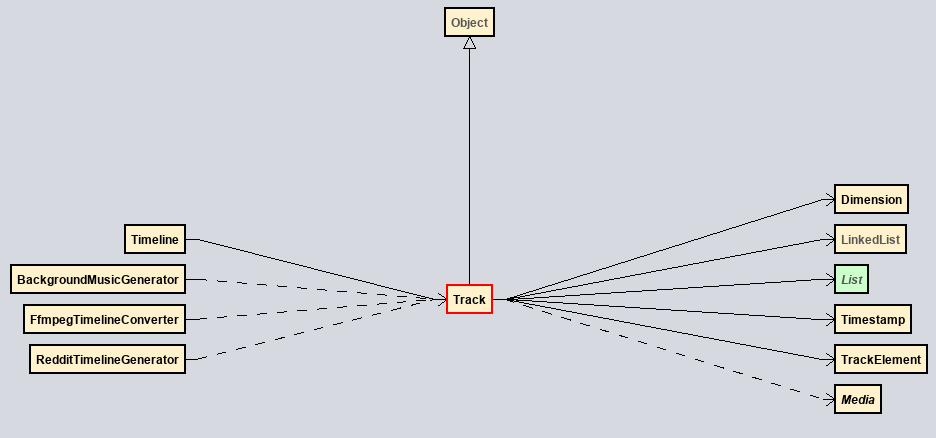
<p><img src="/assets/youtube/timeline.png" alt="" /></p>

<p><img src="/assets/youtube/track-rd.png" alt="" /></p>

<p>In short:</p>

<ul>
  <li>A Timeline has many tracks.</li>
  <li>A track abstracts <code class="highlighter-rouge">Map&lt;Timestamp, TimelineElement&gt;</code>.</li>
  <li>A <code class="highlighter-rouge">TimelineElement</code> is a filterable instance of a <code class="highlighter-rouge">Media</code></li>
</ul>

<h4 id="from-timeline-to-ffmpeg-command">From timeline to FFmpeg command</h4>

<p>So now there exists a timeline but there needs to exist a way to convert that timeline into an FFmpeg command. Here’s
the gist of how this is going to go:</p>

<ol>
  <li>Create media stream for each media element and apply timeline filters sequentially. Both visual and audio streams
must be processed separately.</li>
  <li>Offset each filtered stream to the respective entry timestamp in the video.</li>
  <li>Overlay everything on top of one another.</li>
  <li>Mix all filtered audio streams</li>
  <li>Output to file.</li>
</ol>

<p><img src="/assets/youtube/ffmpeg-flow.png" alt="" /></p>

<p>This is in no way optimal. It uses significantly more resources than it should. 
But it is the only way I found that is able to encode all the data I have from the timeline abstraction.</p>

<p>Writing this into an FFmpeg is borderline trivial. I wrote a class that takes in a Timeline and will compute a command
of the form <code class="highlighter-rouge">ffmpeg &lt;input files&gt; &lt;filter_complex&gt; &lt;output_streams&gt; &lt;misc flags&gt; &lt;output_file&gt;</code></p>

<p>The only part of the command that is interesting is the <code class="highlighter-rouge">filter_complex</code> part. This is what takes the videos and mixes
them. This argument consists of many streams that are connected to each other. All resemble the
form (<a href="https://ffmpeg.org/ffmpeg-filters.html#Filtergraph-syntax-1">official filtergraph documentation</a>):</p>

<div class="highlighter-rouge"><div class="highlight"><pre class="highlight"><code>[input_stream_1][...input_stream_n]filter_name=ARGS,filter_name=ARGS[output_stream]
</code></pre></div></div>

<p>A skeleton of the whole filtergraph looks like this</p>

<div class="highlighter-rouge"><div class="highlight"><pre class="highlight"><code>[1:a]anull[fa1]; // Apply audio filters (anull is a nop)
...
[12]setpts=PTS+0.0010/TB[fv12]; // Offset video and apply video filters (no filters present here)
...
[o12][fv13]overlay=enable='between(t, 0.0120, 0.0220)'[o13]; // Overlay to main stream
...
[fa1]atrim=start=0:end=0.8100,adelay=1|1,apad=whole_dur=7.3810[a0]; // Offset audio
...
[a0]...[a10]amix=inputs=11,volume=11[a] // Join audio streams
</code></pre></div></div>

<p>A full 8-minute video filtergraph can be viewed <a href="/assets/youtube/filtergraph-example.txt">here</a>.</p>

<h3 id="putting-it-all-together">Putting it all together</h3>

<p><img src="/assets/youtube/rendered-timeline.png" alt="" /></p>

<p>Above is a partial render of a 5-minute video timeline. It’s pretty hard to get everything to fit in 1000 pixels. This
is a look at how that timeline gets made.</p>

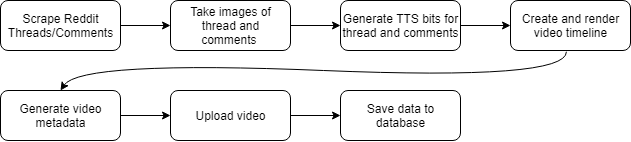
<p>The flow of the program is very linear as you can see below:</p>

<p><img src="/assets/youtube/Bot%20Control%20Flow.png" alt="" /></p>

<p>It’s pretty straight forward, so I’ll keep this section short.</p>

<h3 id="moving-to-the-cloud">Moving to the cloud</h3>

<p>The application is complete (in a sense) but it’s not 100% automated. Someone must run it for a new video to be
generated. That just won’t cut it for me. I need a 100% hands-off solution.</p>

<h4 id="chrome-and-aws-lambda">Chrome and AWS Lambda</h4>

<p>The way images were being taken was extremely slow. It could take around 5–10 minutes for a single video to be imaged.
Moving this task to the cloud could greatly reduce the time required for this task.</p>

<p>Given that the imager was already a Node.js project, the go-to solution was <a href="https://serverless.com/">serverless</a>. All that
was needed was an extra yml file, and the project was in the cloud.</p>

<p>And I wish it were that easy. It turns out that Puppeteer, the library used for controlling a
headless <a href="https://www.chromium.org/">Chromium</a> instance did not play well
with <a href="https://aws.amazon.com/lambda/">AWS Lambda</a>. The size of the bundled Chromium executable greatly exceeded the max
size allowed by Lambda.</p>

<p>The solution arose with <a href="chrome-aws-lambda">chrome-aws-lambda</a>. This bundles a compressed version of Chromium that
satisfies the space requirements of Lambda. There are other libraries that also claim to accomplish this goal but after
thorough testing numerous different solutions chrome-aws-lambda worked the best.</p>

<h4 id="the-java-part-in-ecs">The Java Part In ECS</h4>

<p>Now that the imager is in the cloud, the Java portion of the application must go
too. <a href="https://aws.amazon.com/ecs/">Amazon ECS</a> and <a href="AWS%20Fargate">AWS Fargate</a> is a no-brainer for this. It supports
running <a href="https://www.docker.com/">Docker</a> containers and automatically provisions resources to meet the demands of those
containers.</p>

<p>Building a Docker container is a trivial task that needs little explanation. The cool part is that Docker
will host one free private repository. These repositories are particularly useful because they can be configured to automatically build
from <a href="https://github.com/">GitHub</a>. So when I push to GitHub, Docker detects the push and builds the docker container, 
and that container is pulled with the next execution of the ECS task.</p>

<p>In ECS, a task can be defined and scheduled to run on a certain interval. This allows me to run my generation as often
as I please. I chose to do an execution at 9AM and 3PM MDT.</p>

<h4 id="the-cost">The cost</h4>

<p>Running code in the cloud is not free, or at least that’s what I thought. There are some amazing free-tier offers from
Amazon that make this application extremely cheap to run.</p>

<p>AWS Lambda charges in GB-s. My imaging program uses ~2GB of ram and runs in ~10 seconds. This program is then executed
maybe 80 times to generate a video. The cost would be:</p>

\[compute (seconds) = 10s \times 80s = 800s\]

\[compute (GBs) = 800 \times 2GB = 1600 GBs\]

\[cost = $0.00001667 \times 1600 = $0.027\]

<p>This is not mentioning that Lambda has a 400,000 GB-s free tier so I can generate ~40,000 captures per month
cost-free (minus data transfer rates).</p>

<p>ECS is a bit easier to calculate. A video takes about 12 minutes to generate on a 2 VCPU 4GB ram provision. At the time
of writing, the rates are as follows:</p>

<table>
  <thead>
    <tr>
      <th>Item</th>
      <th>Price</th>
    </tr>
  </thead>
  <tbody>
    <tr>
      <td>per vCPU per hour</td>
      <td>$0.04048</td>
    </tr>
    <tr>
      <td>per GB per hour</td>
      <td>$0.004445</td>
    </tr>
  </tbody>
</table>

<p>So the cost per video is the following:</p>

\[cost = \frac{12}{60} \times ($0.04048 \times 2 + $0.004445 \times 4) = $0.0197\]

<p>So the total cost of making a video is about $0.05 ($0.02 with free tier) without factoring in data transfer costs.</p>

<h3 id="refinement">Refinement</h3>

<p>This application could have been hacked together in a week. But I blew out that timeframe because I didn’t want to have
to deal with the aftermath. I wanted to build this and check in on it every month. So many things had to be changed to
support this idea. For instance, everything that interacted with an external API needed to have
retries (<a href="https://github.com/spring-projects/spring-retry">spring-retry</a>). Every external input to the program: Threads,
Comments, Keywords, had to be tested with a variety of different
inputs (<a href="http://hackage.haskell.org/package/QuickCheck">quickcheck</a>).</p>

<p>I found that this phase of the project dominated the majority of the overall development
time. <a href="https://en.wikipedia.org/wiki/Pareto_principle">Possibly 80% - the Pareto principle in action</a></p>

<h3 id="wrapping-up">Wrapping Up</h3>

<p>This project was one of the most ambitious and complicated projects I had ever worked on. There are over 180 classes
with a combined 7000 LOC at the time of writing this. It was a fun challenge. Here is the result:</p>

<div align="center">
<iframe width="560" height="315" src="https://www.youtube.com/embed/hSwJ0kBz9Es" frameborder="0" allow="accelerometer; autoplay; encrypted-media; gyroscope; picture-in-picture" allowfullscreen=""></iframe>
</div>

<p>This video was generated 100% without any interaction. The tags, description, thumbnail, title, and the first comment
are all generated and uploaded via the application running the cloud.</p>

<h3 id="sharing-my-work">Sharing My Work</h3>

<div class="github-card" data-github="kylepls/chrome-imager" data-width="400" data-height="150" data-theme="default"></div>
<script src="//cdn.jsdelivr.net/github-cards/latest/widget.js"></script>

<div class="github-card" data-github="kylepls/reddit-bot-public" data-width="400" data-height="150" data-theme="default"></div>
<script src="//cdn.jsdelivr.net/github-cards/latest/widget.js"></script>]]></content><author><name></name></author><category term="youtube" /><category term="programming" /><category term="projects" /><summary type="html"><![CDATA[]]></summary></entry><entry><title type="html">3d Printing an FPV Drone</title><link href="http://kylepls.com/quad/" rel="alternate" type="text/html" title="3d Printing an FPV Drone" /><published>2018-11-09T00:00:00+00:00</published><updated>2018-11-09T00:00:00+00:00</updated><id>http://kylepls.com/quad</id><content type="html" xml:base="http://kylepls.com/quad/"><![CDATA[<p>I already have a Blade 350QX3, and it’s fun to fly. It isn’t well-suited for FPV racing. The camera is bulky
and crashes often require buying a new body. To be fair, I don’t think the engineers had FPV racing in mind
when designing this drone. The QX3 is much more focused on aerial photography. In that realm, it performs spectacularly.</p>

<p><img src="/assets/quadcopter/blade350qx3_pic1_edited.png" alt="Blade 350QX3" /></p>

<h2 id="the-parts">The Parts</h2>

<p>So how about an FPV rig? To make this all work, I had to buy some parts.</p>

<table>
  <thead>
    <tr>
      <th>Part</th>
      <th>Price</th>
      <th>Retailer</th>
    </tr>
  </thead>
  <tbody>
    <tr>
      <td>5.8G FPV Receiver</td>
      <td>$17.84</td>
      <td><a href="https://www.ebay.com/itm/162440532960?_trksid=p2057872.m2749.l2649&amp;ssPageName=STRK:MEBIDX:IT">Ebay</a></td>
    </tr>
    <tr>
      <td>FPV Camera</td>
      <td>$7.99</td>
      <td><a href="https://us.banggood.com/Wholesale-Warehouse-600TVL-8_0MP-14-2_8mm-CMOS-FPV-170-Degree-Wide-Anlge-Lens-Camera-PALNTSC-wp-Usa-984345.html?rmmds=myorder">Banggood</a></td>
    </tr>
    <tr>
      <td>BR2205 Brushless Motor X4</td>
      <td>$8.99 * 4 = $35.96</td>
      <td><a href="https://us.banggood.com/Wholesale-Warehouse-Racerstar-Racing-Edition-2205-BR2205-2600KV-2-4S-Brushless-Motor-CWCCW-For-QAV250-ZMR250-260-280-RC-wp-Usa-1071132.html?rmmds=myorder">Banggood</a></td>
    </tr>
    <tr>
      <td>RS30x4 30A ESC</td>
      <td>$46.99</td>
      <td><a href="https://us.banggood.com/Wholesale-Warehouse-Racerstar-RS30x4-30A-Blheli_S-2-4S-4-in-1-Brushless-ESC-with-5V-3A-SBEC-for-FPV-Racing-wp-Usa-1119836.html?rmmds=myorder">Banggood</a></td>
    </tr>
    <tr>
      <td>PDB-XT60</td>
      <td>$6.52</td>
      <td><a href="https://us.banggood.com/Wholesale-Warehouse-Matek-Systems-PDB-XT60-W-BEC-5V-12V-2oz-Copper-For-RC-Multirotors-wp-Usa-1049051.html?rmmds=myorder">Banggood</a></td>
    </tr>
    <tr>
      <td>5.8G FPV Transmitter</td>
      <td>$13.99</td>
      <td><a href="https://us.banggood.com/Wholesale-Warehouse-Eachine-VTX03-Super-Mini-5_8G-72CH-025mW50mw200mW-Switchable-FPV-Transmitter-wp-Usa-1114206.html?rmmds=myorder">Banggood</a></td>
    </tr>
    <tr>
      <td>F3 Flight Controller</td>
      <td>$21.99</td>
      <td><a href="https://us.banggood.com/Wholesale-Warehouse-Upgrade-NAZE32-F3-Flight-Controller-Acro-6-DOF-Deluxe-10-DOF-for-Multirotor-Racing-wp-Usa-1010232.html?rmmds=myorder">Banggood</a></td>
    </tr>
    <tr>
      <td>5x4x3 Propellers</td>
      <td>$8.59</td>
      <td><a href="https://us.banggood.com/Wholesale-Warehouse-7-Pairs-Kingkong-5X4X3-5040-5-Inch-3-Blade-Rainbow-Colorful-Propeller-CW-CCW-for-FPV-Racer-wp-Usa-1067563.html?rmmds=myorder">Banggood</a></td>
    </tr>
  </tbody>
</table>

<p>All of these parts total to $172.76. The total cost can be reduced closer to $100 if you choose to wait for all the Banggood items to ship from
their CN warehouse, but that just takes too long.</p>

<h2 id="the-design">The Design</h2>

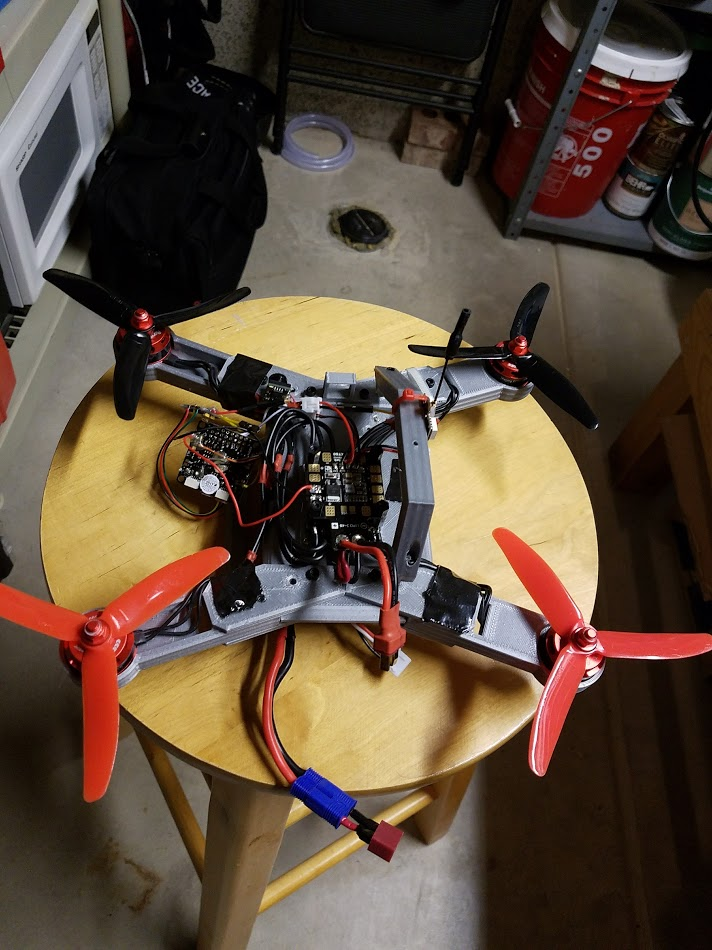
<p>I had to start with something. Getting anything made will act as a good starting point. That does
not excuse me for this first design. It looks horrible.</p>

<iframe src="https://myhub.autodesk360.com/ue28516fe/shares/public/SH7f1edQT22b515c761e373b0eba9e639d0b?mode=embed" width="100%" max-width="640" height="480" allowfullscreen="true" webkitallowfullscreen="true" mozallowfullscreen="true" frameborder="0"></iframe>

<p>So after some deep thinking, I went back to Fusion and tried again. This time I made something much more viewable. While
documenting this, I noticed that I did not reference any existing design. Usually, when building aerial machines, more
than just looks goes into the design. I am very lucky that this works.</p>

<iframe src="https://myhub.autodesk360.com/ue28516fe/shares/public/SH7f1edQT22b515c761e07afbf48e0e5e03e?mode=embed" width="100%" max-width="640" height="480" allowfullscreen="true" webkitallowfullscreen="true" mozallowfullscreen="true" frameborder="0"></iframe>

<h2 id="printing">Printing</h2>

<p>I am going to guess that it took around 30 hours to print all the parts on my janky 3d printer. This one was a
long haul.</p>

<p><img src="/assets/quadcopter/printing.jpg" alt="Printing the body" /></p>

<p>Here is the largest part of the body being printed. This odd-shaped square thing took over 3 hours to print.</p>

<h2 id="assembly">Assembly</h2>

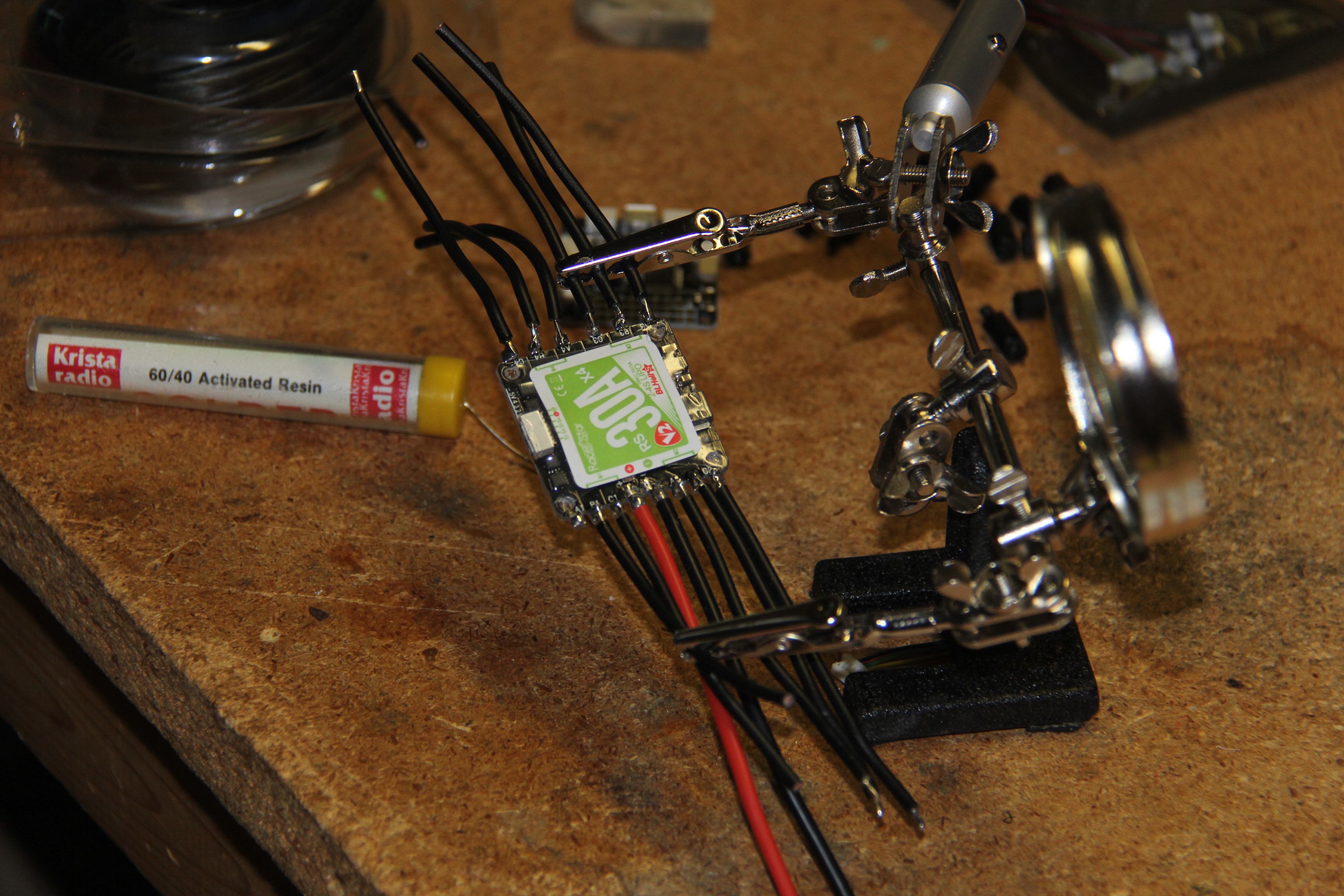
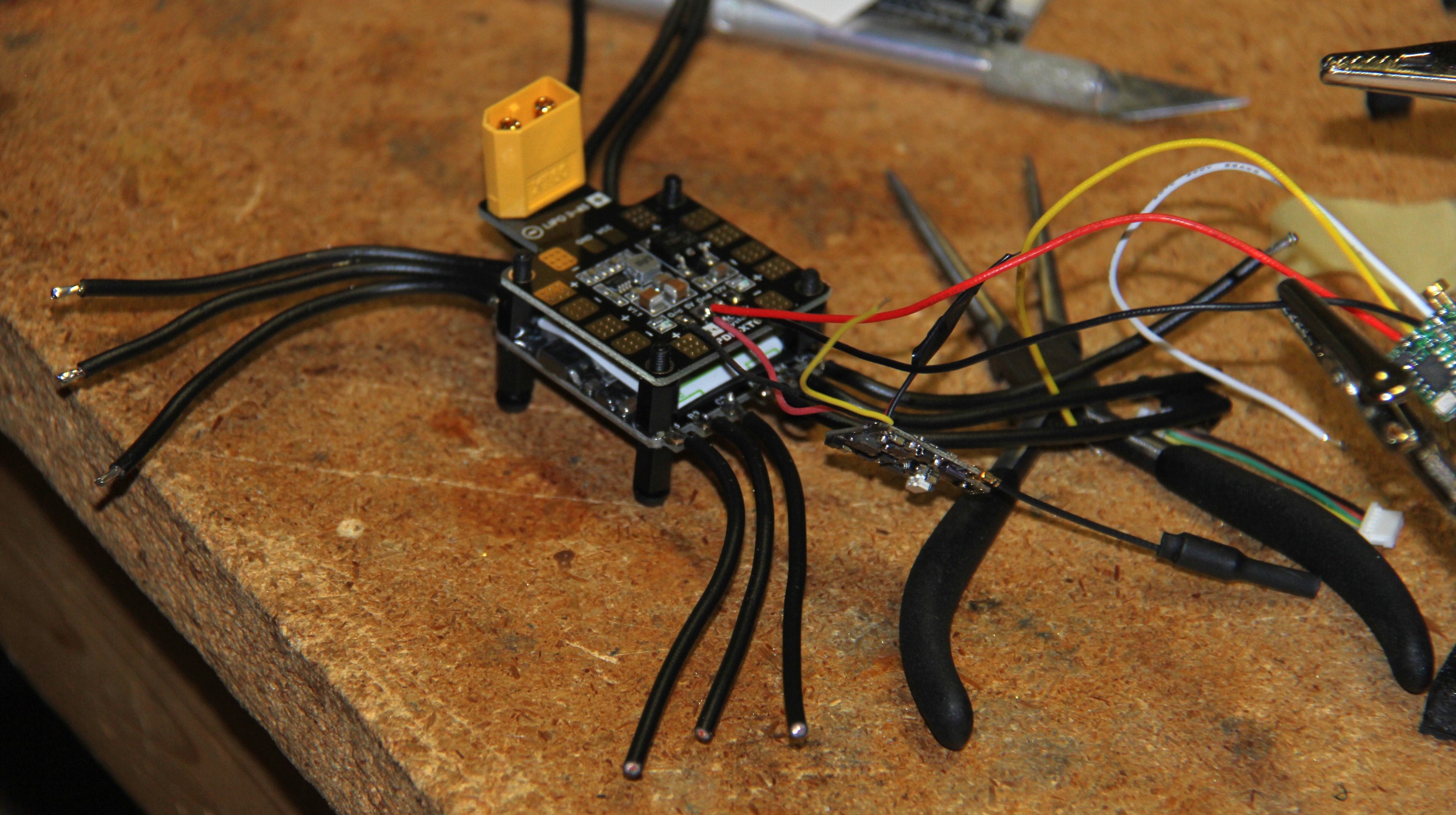
<p>I started the assembly with the electronics. The main parts are the Electronic Speed Controller (ESC), Power
Distribution Board (PDB), and the Flight Controller. The ESC is what will send current to the four motors. The PDB takes
the current from the battery and delivers it to the other components. Finally, the Flight Controller takes in all the
telemetry data from the on-board sensors and uses that to tell the ESC how much current to send to each motor.</p>

<p>It is common to take these three components and stack them on top of each other. This is referred to as ‘the stack.’</p>

<p><img src="/assets/quadcopter/soldering-esc.jpg" alt="Adding extension wires to ESC" />
Wiring up the ESC.</p>

<p><img src="/assets/quadcopter/wiring-esc.jpg" alt="" />
ESC goes on the bottom, PDB in the middle, and the FC goes on top.</p>
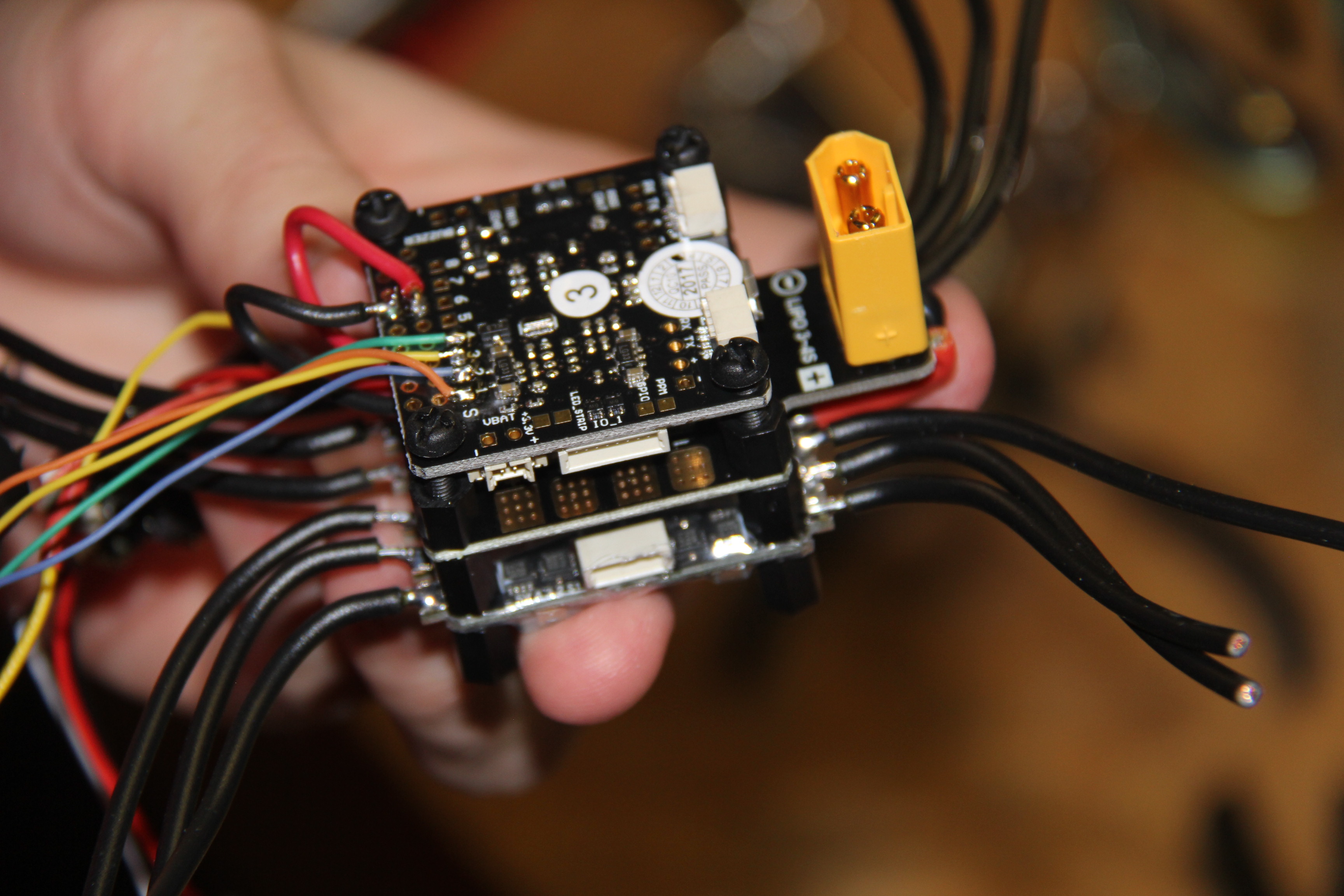
<p><img src="/assets/quadcopter/completed-stack.jpg" alt="" /></p>

<h5 id="with-most-of-the-electronics-done-i-started-the-body">With most of the electronics done, I started the body.</h5>

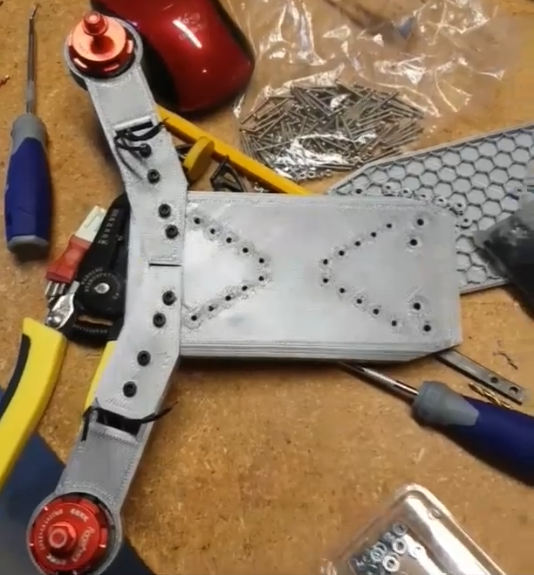
<p>The body is composed of four arms connected to a central body with a small canopy on top. Each arm has 2 weak points in
it so that it will snap in the case of a rough landing. In the first iteration of the design, I only included one joint.</p>

<p><img src="/assets/quadcopter/frame-wip.png" alt="" /></p>

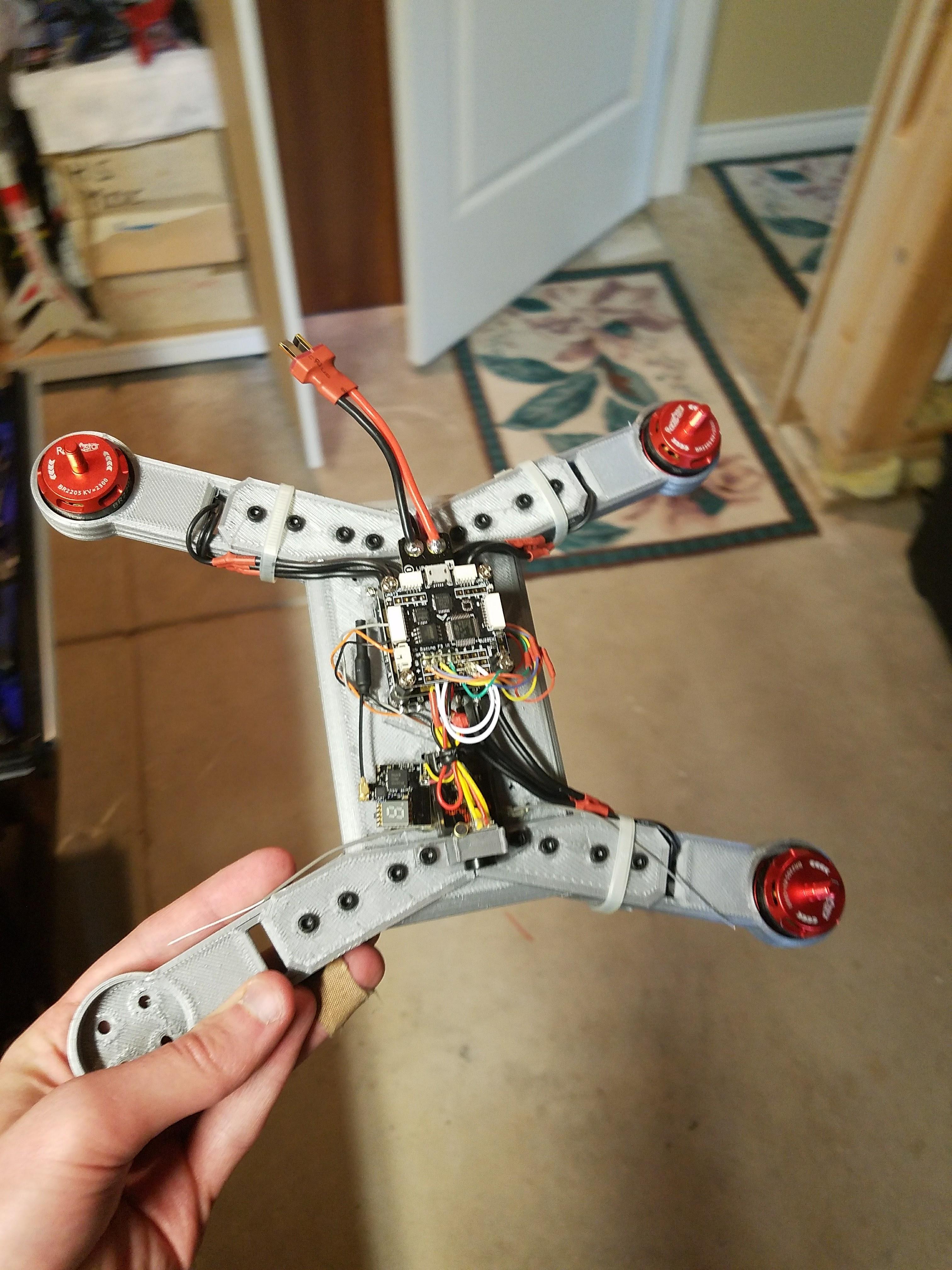
<p>Print two more arms and then the body is done. I’ll add the canopy in later.
<img src="/assets/quadcopter/frame-arms.jpg" alt="" /></p>

<p>Attaching the propellers.
<img src="/assets/quadcopter/props-installed.png" alt="" /></p>

<p>For a battery, I used a 30C 3000mAh battery. I did not have to buy this as I had been using it with my 350 QX3.</p>

<p><a href="https://www.ebay.com/itm/Lectron-11-1v-3000mAh-30C-3S-LiPo-Battery-w-EC3-Connector-350QX-BLADE-450/171639662303?hash=item27f68566df:g:gB0AAOSwWM9Zo4xL">Link</a></p>

<p>I had some FPV footage of it flying around, but it appears to have been deleted. Next time I get around to flying this thing,
I’ll post the video here.</p>]]></content><author><name></name></author><category term="projects" /><summary type="html"><![CDATA[I already have a Blade 350QX3, and it’s fun to fly. It isn’t well-suited for FPV racing. The camera is bulky and crashes often require buying a new body. To be fair, I don’t think the engineers had FPV racing in mind when designing this drone. The QX3 is much more focused on aerial photography. In that realm, it performs spectacularly.]]></summary></entry><entry><title type="html">An Electric Longboard 4x Stronger Than a Boosted</title><link href="http://kylepls.com/longboard/" rel="alternate" type="text/html" title="An Electric Longboard 4x Stronger Than a Boosted" /><published>2018-06-18T03:26:42+00:00</published><updated>2018-06-18T03:26:42+00:00</updated><id>http://kylepls.com/longboard</id><content type="html" xml:base="http://kylepls.com/longboard/"><![CDATA[<p>Long boards are a great mode of transportation for going down hills or cruising on a sidewalk. The obvious downside to
this is that you’ll be walking uphill if your journey involves any inclines. Electric long boards are a great solution to
this problem. They just go wherever you take them.</p>

<p>A few months ago I thought I would take a stab at making one of these on the cheap. Future me now realizes that these
things are anything but affordable.</p>

<hr />

<h3 id="attempt-1">Attempt 1</h3>

<p>Here’s my first attempt at making this. I found the cheapest parts I could find and slapped it all together in around 2 hours.
Minimal effort required.</p>

<table>
  <thead>
    <tr>
      <th>Part</th>
      <th>Price</th>
      <th>Total</th>
    </tr>
  </thead>
  <tbody>
    <tr>
      <td><a href="https://hobbyking.com/en_us/kd-53-30-high-voltage-brushless-outrunner-190kv.html">KEDA 190KV Motor</a></td>
      <td>$50</td>
      <td> </td>
    </tr>
    <tr>
      <td><a href="https://www.amazon.com/gp/product/B01MU91KTA/ref=oh_aui_detailpage_o09_s00?ie=UTF8&amp;psc=1">Volador 42” Longboard</a></td>
      <td>$60</td>
      <td> </td>
    </tr>
    <tr>
      <td><a href="https://www.amazon.com/gp/product/B00IO5D604/ref=oh_aui_detailpage_o09_s01?ie=UTF8&amp;psc=1">83mm Longboard Wheels</a></td>
      <td>$27</td>
      <td> </td>
    </tr>
    <tr>
      <td><a href="https://www.amazon.com/gp/product/B073GWX3HK/ref=oh_aui_detailpage_o09_s01?ie=UTF8&amp;psc=1">XCSOURCE DIY Electric Skateboard Longboard Kit</a></td>
      <td>$24</td>
      <td> </td>
    </tr>
    <tr>
      <td>VESC</td>
      <td>$95</td>
      <td> </td>
    </tr>
    <tr>
      <td><a href="https://www.banggood.com/2_4Ghz-Mini-Wireless-Remote-Controller-Receiver-Electric-Skateboard-Longboard-p-1179725.html?rmmds=myorder">Controller</a></td>
      <td>$34</td>
      <td> </td>
    </tr>
    <tr>
      <td>6mm Bullet Connectors</td>
      <td>$7</td>
      <td> </td>
    </tr>
    <tr>
      <td> </td>
      <td> </td>
      <td>$296</td>
    </tr>
  </tbody>
</table>

<p>Connect the motor and two batteries I had lying around, and that’s it. Perfect.</p>

<iframe src="/assets/longboard/initial.mp4" width="640" height="480"></iframe>

<p>But it did not end there. I took it outside, and it made it about 300 feet before the motor mount came loose from the
trucks. The reason is that the vibrations caused by the pathway made the setscrews in the mount come loose. This is
the gist of the design (three screws clamping the mount to the circular trucks). Sadly, this also ruined my motor.</p>

<p><img src="/assets/longboard/motor-mount-concept.png" alt="Motor mount concept" /></p>

<p>There was also another unforeseen issue. The belt that comes with the motor mount kit is an HTD 3M belt. The smaller
teeth in the belt are not able to maintain a solid grip on the pulley while under heavy acceleration. There was a
noticeable sound made when the belt skipped over the teeth of the pulley.</p>

<p>The most glaring issue of them all is that all the electronics are completely exposed. If a rock were to hit the ESC or
batteries, there would be a good chance of breaking something or possibly a fire. Some sort of enclosure would be a
requirement.</p>

<hr />

<h3 id="attempt-2">Attempt 2</h3>

<p>Okay, let’s make some changes:</p>

<ul>
  <li>Replace belt drive with much less skippy chain drive.</li>
  <li>Make enclosure to hold electronics</li>
  <li>Minor battery improvements</li>
</ul>

<table>
  <thead>
    <tr>
      <th>Part</th>
      <th>Price</th>
      <th>Total</th>
    </tr>
  </thead>
  <tbody>
    <tr>
      <td><a href="https://www.banggood.com/Racerstar-5065-BRH5065-200KV-6-12S-Brushless-Motor-With-Gear-For-Balancing-Scooter-p-1117658.html?rmmds=myorder">Racerstar 200KV Motor</a></td>
      <td>$42</td>
      <td> </td>
    </tr>
    <tr>
      <td><a href="https://www.banggood.com/Sprocket-Chain-Wheel-For-8044-Electric-Longboard-Skateboard-Parts-DIY-Motor-p-1170459.html?rmmds=myorder">Sprocket Chain Wheel</a></td>
      <td>$12</td>
      <td> </td>
    </tr>
    <tr>
      <td><a href="https://www.amazon.com/gp/product/B071DG2LS6">12x24” Kydex Sheet</a></td>
      <td>$17</td>
      <td> </td>
    </tr>
    <tr>
      <td>Sketchy 10s2p battery</td>
      <td>$33</td>
      <td> </td>
    </tr>
    <tr>
      <td>10s Hoverboard Charger</td>
      <td>$12</td>
      <td> </td>
    </tr>
    <tr>
      <td> </td>
      <td> </td>
      <td>$116</td>
    </tr>
  </tbody>
</table>

<p>First things first. It was not smart to use these batteries. They are way too cheap to be legit and could have likely
started a fire. I was pretty stupid to even touch these things. But here we go anyway.</p>

<p>Starting with the battery. It came looking like this:
<img src="/assets/longboard/sketchy-batteries.jpg" alt="Random lookalike batteries" /></p>

<p>I repacked it so the last four cells were on the side and not the top. It definitely looks like I know what I’m doing
here.</p>

<p><img src="/assets/longboard/playing-with-lion.png" alt="Me being an idiot" /></p>

<p>Now came the motor and the chain drive. This was trivial. Just had to take off the old stuff and slap on the new. The
enclosure was the hardest part. I cut the 24” Kydex sheet to size and put it in the oven for about 3 minutes,
periodically checking the temperature with an IR thermometer. Once it was at around 350°F I pushed it around a 3D
printed mold to get the desired shape. Some further tweaking was required by heating parts of the enclosure with a heat
gun and pushing it into place. Then brass wood inserts were inserted into the board to provide a thread for the screws.
Finally, everything was screwed into place.</p>

<p><img src="/assets/longboard/simple-longboard-take2.png" alt="Take 2" /></p>

<p>This design also had major faults. I still have not addressed the motor mount issues and the enclosure looks terrible.
Predictably, the batteries gave out after six or so charge cycles (thankfully there was no fire).</p>

<hr />

<h3 id="attempt-3">Attempt 3</h3>

<p>This time I did some more research on lithium batteries, and I think I have it down. I got rid of the sketchy pack
(safely) and decided to make my own from scratch.</p>

<ul>
  <li>New more reliable battery</li>
  <li>Add some telemetry and whatnot</li>
  <li>Improve enclosure</li>
</ul>

<table>
  <thead>
    <tr>
      <th>Part</th>
      <th>Price</th>
      <th>Total</th>
    </tr>
  </thead>
  <tbody>
    <tr>
      <td>HM-10 Bluetooth Module</td>
      <td>$7</td>
      <td> </td>
    </tr>
    <tr>
      <td><a href="https://www.imrbatteries.com/samsung-30q-18650-3000mah-15a-flat-top-battery/">20 Samsung 30Q Batteries</a></td>
      <td>$110</td>
      <td> </td>
    </tr>
    <tr>
      <td><a href="https://www.amazon.com/gp/product/B01ER5IA8C/ref=oh_aui_detailpage_o04_s00?ie=UTF8&amp;psc=1">103mm Heat Shrink</a></td>
      <td>$7</td>
      <td> </td>
    </tr>
    <tr>
      <td>10S BMS</td>
      <td>$10</td>
      <td> </td>
    </tr>
    <tr>
      <td>3/16” Ground Strap</td>
      <td>$7</td>
      <td> </td>
    </tr>
    <tr>
      <td> </td>
      <td> </td>
      <td>$141</td>
    </tr>
  </tbody>
</table>

<p>Making the battery pack was the main challenge of this revision. I was stressed out the entire time because shorting one
of these cells means fire. Here was my plan for the battery.
<img src="/assets/longboard/professional-wiring-diagram.png" alt="Drawn in MSPaint" /></p>

<p>The design doesn’t make a lot of sense now, but I thought it was cool at the time. It was also important to add a
connector at the top of the two packs so that heat shrink could be put over each column of cells.</p>

<p><img src="/assets/longboard/simple-longboard-battery-installed.png" alt="New Bat" />
Also notice how the front truck is silver now. I snapped my front truck after running into a railing. Be safe!</p>
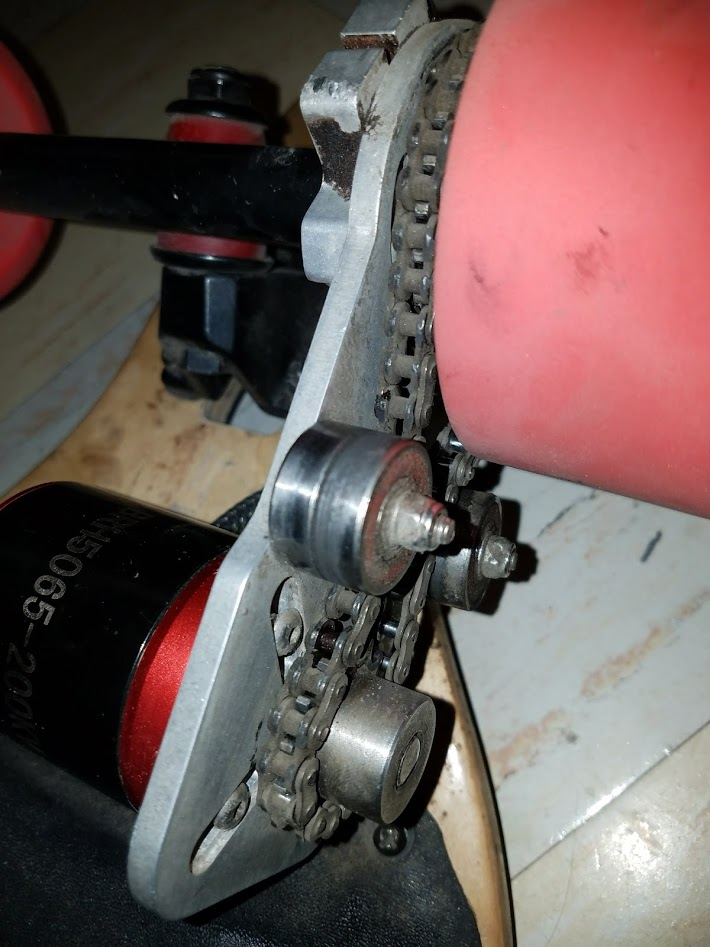
<p>Notice how the motor mount is not at a right angle to the trucks. That will be a problem. Also, the battery weighs a fair
amount. To have that much mass pounding on my poor enclosure while I hit speed bumps at 20mph means it likely won’t
last.</p>

<p>And soon enough the enclosure and the motor mount were broken.</p>

<hr />

<h3 id="attempt-4">Attempt 4</h3>

<p>So the motor mount actually ended up ruining my trucks. The cheap metal ended up just snapping. Sadly, I don’t have a
picture to share. Time to fix the motor mount!</p>

<table>
  <thead>
    <tr>
      <th>Part</th>
      <th>Price</th>
      <th>Total</th>
    </tr>
  </thead>
  <tbody>
    <tr>
      <td>Caliber 50* Trucks</td>
      <td>$40</td>
      <td> </td>
    </tr>
    <tr>
      <td>New Motor Mount</td>
      <td>$60</td>
      <td> </td>
    </tr>
    <tr>
      <td>25H Chain</td>
      <td>$11</td>
      <td> </td>
    </tr>
    <tr>
      <td> </td>
      <td> </td>
      <td>$101</td>
    </tr>
  </tbody>
</table>

<p>I had hoped that spending top dollar on a motor mount would magically make all my problems go away. Sadly, I was
mistaken. This new mount gave me even more problems than the last. First, I was sent the wrong mount, then more serious
problems arose.</p>

<p><img src="/assets/longboard/motor-mount-chain-idlers.png" alt="This is stupid" /></p>

<p>I know you’re all saying I’m an idiot for using bearings as idlers for a chain. I also think this is stupid. But I
wanted to see if it would work while my new mount was in the mail. It actually made a really cool note when I spun up
the motor.</p>

<p>New motor mount came!
<img src="/assets/longboard/motor-mount-chain.png" alt="Less Jank" /></p>

<p>The original mount came with a M5 screw for the clamp. I wasn’t able to torque it down hard enough for the mount to stay
on, so I drilled it out and tapped it for an M6 screw with a locknut.</p>

<p>Lots of Loctite were used in the battle to keep this damn thing from wobbling.
<img src="/assets/longboard/disgusting-motor-mount.png" alt="Ewww" /></p>

<p>The battle was finally lost when it gave out on me while I was riding.
<img src="/assets/longboard/broken-motor-mount.png" alt="$$$ != quality" /></p>

<p><img src="/assets/longboard/broken-motor-mount-2.png" alt="Sad Violin" /></p>

<p>Well, now I’ve spent all this money and have nothing to show for it. Funny enough, this one guy on my campus saw I rode
my board a lot and gave me a bunch of parts from one of his electric boards.</p>

<h3 id="attempt-5">Attempt 5</h3>

<p>I am pretty sick of stuff breaking while I’m riding. I want to go all out and try to make the most reliable board I can.
I also was able to sell my old board to a friend and get a fair amount of cash back. Here we go again!</p>

<ul>
  <li>More reliable motor mount</li>
  <li>Huge battery to power 2 motors</li>
  <li>New enclosure for batteries</li>
  <li>Sleek design</li>
</ul>

<table>
  <thead>
    <tr>
      <th>Part</th>
      <th>Price</th>
      <th>Total</th>
    </tr>
  </thead>
  <tbody>
    <tr>
      <td>TorqueBoards motor mount x2</td>
      <td>Free</td>
      <td> </td>
    </tr>
    <tr>
      <td>TB 6355 190kv x2</td>
      <td>Free</td>
      <td> </td>
    </tr>
    <tr>
      <td>TB Anti-spark switch</td>
      <td>Free</td>
      <td> </td>
    </tr>
    <tr>
      <td>TB VESC</td>
      <td>Free</td>
      <td> </td>
    </tr>
    <tr>
      <td>TB 16T Motor Pulley x2</td>
      <td>Free</td>
      <td> </td>
    </tr>
    <tr>
      <td>TB 36T Drive Wheel Pulley</td>
      <td>Free</td>
      <td> </td>
    </tr>
    <tr>
      <td>TB 255mm Belt</td>
      <td>Free</td>
      <td> </td>
    </tr>
    <tr>
      <td><a href="https://www.amazon.com/Atom-Longboards-91047-Drop-Through-Longboard/dp/B0056IY39K/ref=sr_1_8?ie=UTF8&amp;qid=1529272700&amp;sr=8-8&amp;keywords=atom%20longboard">Atom Drop Through 41”</a></td>
      <td>Free</td>
      <td> </td>
    </tr>
    <tr>
      <td><a href="https://www.amazon.com/Zwish-Skateboard-Waterproof-Longboard-Griptape/dp/B01A0ZI5P6/ref=sr_1_10?ie=UTF8&amp;qid=1525733412&amp;sr=8-10&amp;keywords=grip%2btape%2blongboard&amp;th=1">Grip Tape</a></td>
      <td>$10</td>
      <td> </td>
    </tr>
    <tr>
      <td><a href="https://www.amazon.com/MBS-13401-All-Terrain-Longboard-Wheels/dp/B015GJN0BA/ref=sr_1_1?ie=UTF8&amp;qid=1525733192&amp;sr=8-1&amp;keywords=mbs%20100">MBS 100 Wheels</a></td>
      <td>$70</td>
      <td> </td>
    </tr>
    <tr>
      <td><a href="https://www.amazon.com/Genesis-GHG1500A-Temperature-Nozzle-Attachments/dp/B00EU2T8GG/ref=sr_1_4?s=hi&amp;ie=UTF8&amp;qid=1525733254&amp;sr=1-4&amp;keywords=heat%20gun">Heat Gun</a></td>
      <td>$16</td>
      <td> </td>
    </tr>
    <tr>
      <td><a href="https://diyelectricskateboard.com/collections/drive-wheel-pulleys/products/36t-abec11-drive-wheel-pulley-only">TB 36T Drive Wheel Pulley</a></td>
      <td>$37</td>
      <td> </td>
    </tr>
    <tr>
      <td><a href="https://diyelectricskateboard.com/collections/longboard-trucks/products/torqueboards-v2-pro-trucks">TB 180mm Trucks</a></td>
      <td>$60</td>
      <td> </td>
    </tr>
    <tr>
      <td><a href="https://www.ebay.com/itm/142639011539">Battery Readout</a></td>
      <td>$5</td>
      <td> </td>
    </tr>
    <tr>
      <td><a href="https://www.ebay.com/itm/142639011539">HTD 255-5M-12 Belt</a></td>
      <td>$6</td>
      <td> </td>
    </tr>
    <tr>
      <td><a href="https://www.ebay.com/itm/36V-10S-20A-18650-Li-ion-Lipolymer-battery-BMS-PCB-PCM-for-ebike-ebicycle-DIY/172623855023?_trkparms=aid%3D222007%26algo%3DSIM.MBE%26ao%3D2%26asc%3D50544%26meid%3D834c982e0a79454c92bde9f6c19313c6%26pid%3D100005%26rk%3D5%26rkt%3D12%26mehot%3Dpp%26sd%3D282923151393%26itm%3D172623855023&amp;_trksid=p2047675.c100005.m1851">BMS</a></td>
      <td>$11</td>
      <td> </td>
    </tr>
    <tr>
      <td><a href="https://www.amazon.com/gp/product/B071DG2LS6/ref=oh_aui_detailpage_o06_s00?ie=UTF8&amp;psc=1">Kydex Sheet</a></td>
      <td>$17</td>
      <td> </td>
    </tr>
    <tr>
      <td>Enertion NanoX controller</td>
      <td>$35</td>
      <td> </td>
    </tr>
    <tr>
      <td><a href="https://lunacycle.com/shrink-wrap-tube-black-rubber-like-ebike-battery-pack-per-foot/">9” Heat Shrink</a></td>
      <td>$12</td>
      <td> </td>
    </tr>
    <tr>
      <td><a href="https://lunacycle.com/36v-4amp-luna-mini-charger/">10S charger</a></td>
      <td>$60</td>
      <td> </td>
    </tr>
    <tr>
      <td><a href="https://www.imrbatteries.com/samsung-30q-18650-3000mah-15a-flat-top-battery/">40 Samsung 30Q Batteries</a></td>
      <td>$190</td>
      <td> </td>
    </tr>
    <tr>
      <td> </td>
      <td> </td>
      <td>$529</td>
    </tr>
  </tbody>
</table>

<p>I wish I had taken a picture of the board before I started cleaning it all up. It was not in great shape. There were
lots of holes and small defects that I wanted to fix. Some wood filler and a finishing sander took care of fixing this.</p>

<p><img src="/assets/longboard/longboard-filling.png" alt="That LiPo is totally not puffed" /></p>

<p>Next, I wanted to plug the holes for the trucks. I know I want to top mount it, so these won’t be needed anymore.</p>

<p><img src="/assets/longboard/longboard-filling-2.png" alt="Nasty looking" /></p>

<p>Some sealant can’t hurt.</p>

<p><img src="/assets/longboard/longboard-sealant.jpg" alt="mmmm" /></p>

<p>I taped everything up for painting. For some reason, I put the trucks on for this picture.
<img src="/assets/longboard/unpainted.jpg" alt="done" /></p>

<p><img src="/assets/longboard/painted.jpg" alt="black now" /></p>

<p>Here’s the new plan for the internals. One VESC is missing in this picture.
<img src="/assets/longboard/30q-arrangement.jpg" alt="30Q goodness" /></p>

<p>Now the batteries. I 3D printed this jig to assist me while soldering the packs.
<img src="/assets/longboard/30q-rig.jpg" alt="Soldering these isn't good" /></p>

<p><img src="/assets/longboard/30q-soldering.jpg" alt="perfect" /></p>

<p>Now a test run</p>

<p><img src="/assets/longboard/battery-installed.jpg" alt="blue shirt" /></p>

<p>I also made an aluminum enclosure for both of my VESCs. This should help a lot with the heat these things produce.</p>

<p><img src="/assets/longboard/vesc-heatsink.jpg" alt="heat sink" /></p>

<p>Now onto the enclosure. I spent 3 days 3D printing a new mold for the enclosure. It’s important to add some tape on top
to help keep the heat away from the PLA.</p>

<p><img src="/assets/longboard/kydex-mold.jpg" alt="mold v2" /></p>

<p>Some quality time with a heat gun yielded some impressive results.</p>

<p><img src="/assets/longboard/kydex-on-mold.jpg" alt="heatt" /></p>

<p>Then cut it out and sand the edges. I also drilled some mounting holes while I was at it.</p>

<p><img src="/assets/longboard/kydex-trimmed.jpg" alt="sleek" /></p>

<p>Finally, add some holes for the motor leads and a few buttons.</p>

<p><img src="/assets/longboard/enclosure-mounted.jpg" alt="almost done" /></p>

<p>I didn’t take a picture of the battery with the heat shrink on, but this heat shrink is awesome!</p>

<p><img src="/assets/longboard/big-heat-shrink.jpg" alt="awesome!" /></p>

<p>Finally, it’s done!</p>

<iframe src="/assets/longboard/burnout.mp4" width="640" height="480"></iframe>

<p>And yes, that is smoke.</p>]]></content><author><name></name></author><category term="projects" /><category term="diy" /><summary type="html"><![CDATA[Long boards are a great mode of transportation for going down hills or cruising on a sidewalk. The obvious downside to this is that you’ll be walking uphill if your journey involves any inclines. Electric long boards are a great solution to this problem. They just go wherever you take them.]]></summary></entry><entry><title type="html">3d Printing a 3d Printer With A 3d Printer</title><link href="http://kylepls.com/3dPrinter/" rel="alternate" type="text/html" title="3d Printing a 3d Printer With A 3d Printer" /><published>2017-01-17T03:26:42+00:00</published><updated>2017-01-17T03:26:42+00:00</updated><id>http://kylepls.com/3d-printing-a-3d-printer-with-a-3d-printer</id><content type="html" xml:base="http://kylepls.com/3dPrinter/"><![CDATA[<style type="text/css">
img, video {
    max-height: 65vh;
}
</style>

<p>3d printers are really cool. You put plastic in, and it spits out highly detailed parts. By building a 3d printer,
I wanted to learn how these devices work and possibly save a few bucks. First comes the model.</p>

<p>This was the first project I modeled using CAD software. It’s actually the first real engineering project I embarked
on. I didn’t know where to start, so I just went with the most flashy option I could find in terms of software. I started
with a cracked version of Solidworks; there was no way you could get me to pay $4,000+ for a program I didn’t even know if I could
use. Anyway…</p>

<p>Back to the model. Here are some of the worst models I have ever made. Without any prior CAD instruction on how to use
CAD, I would say these aren’t too bad.</p>

<h3 id="attempt-1">Attempt 1</h3>

<p>This is a prime example of me having no idea what I’m doing. I just took some parts and joined them together. It didn’t turn out very well.
<img src="/assets/3dprinter/attempt1.png" alt="" /></p>

<p>This is not good. I don’t really know what I was going for with this design, but it offered a good lesson in how to
create and join different components.</p>

<h3 id="attempt-2">Attempt 2</h3>

<p>Okay. Let’s try this again. I needed a more rigid frame. For that, I went online and drew inspiration from different 3d
printers that I found in Google Images. There’s no hiding that the Prusa I3 is the most popular printer design out
there, so my design copies the major features of the I3.</p>

<p><img src="/assets/3dprinter/attempt2.png" alt="" /></p>

<p>This is quite a big leap in terms of the design. There are now three axes and a rigid-looking frame. It could use some
improvements though.</p>

<h3 id="attempt-3">Attempt 3</h3>

<p><img src="/assets/3dprinter/attempt3.png" alt="" /></p>

<p>This took me several hours to get right. I even had Solidworks crash several times while I was designing the model
and had to restart more times than I would have liked to. That’s likely because Solidworks is written for high-end
workstations with $10,000 graphics cards.</p>

<p>It’s still not that good. But it was definitely an improvement over the last one, featuring three axes instead of one and looking much more rigid. There are some major problems though. I included the sidebar to show that the model is a mess.
References are missing, nothing is organized, and there’s a random X-rod just hanging outside the model.</p>

<h3 id="attempt-4">Attempt 4</h3>

<p><img src="/assets/3dprinter/attempt4.png" alt="" /></p>

<p>This is just Attempt 3 but with a few touch-ups. This is something that I can make.</p>

<div style="display: flex; flex: 0 1 auto; justify-content: space-between; align-items: center">
    <img src="/assets/3dprinter/attempt4.png" style="width: 49%" />
    <img src="/assets/3dprinter/attempt4-moving.webp" style="width: 49%" />
</div>

<h2 id="building">Building</h2>

<p>For materials, I decided on some wood from a local Lowes. It’s affordable and I can get as much of it as I need.
I have access to a chop saw, so accurate cuts are pretty straightforward to achieve. 
The most challenging part is going to be making the parts precise enough so that it all fits together. 
My Dad has quite a bit of experience when it comes to woodworking, so I enlisted him to help me on my project. 
Thanks Dad!</p>

<p><img src="/assets/3dprinter/frame.jpg" alt="" /></p>

<p>It took a lot longer than I expected to measure and cut everything, but it was worth it.</p>

<hr />

<h3 id="continuity-error">Continuity Error</h3>

<p>I write these posts after I finish building something. Sometimes I forget to take pictures of some of the steps along
the way. Here’s what I forgot to document. I made the X-axis carriage, installed some linear rods, bearings, steppers,
and belts. Just like that, I had the worst 3d printer ever made.</p>

<p>I didn’t have any 3d printer components yet, so I duct taped a pencil to the end and tried to draw some things.
These drawings didn’t turn out very well as the belts aren’t even tight at this point.</p>

<div style="display: flex; justify-content: space-between; align-items: center">
    <img src="/assets/3dprinter/penplotter.jpg" style="width: 49%;" />
    <img src="/assets/3dprinter/penplotter-drawing.jpg" style="width: 49%;" />
</div>
<p><br /></p>

<video controls="" width="50%">
    <source src="/assets/3dprinter/penplotter-drawing.mp4" />
    Your browser does not support the video tag.
</video>

<p>There are some serious problems with this design though. The X-axis is supported completely by the threaded rod, the
Y-axis is a piece of wood, and don’t get me started about the X-carriage.</p>

<p>Back to Solidworks.</p>

<h3 id="attempt-5">Attempt 5</h3>

<p>I am encountering a lot of trouble trying to backtrack through this project because I have this cluttered directory full
of random files.</p>

<p><img src="/assets/3dprinter/attempt5-parts-list.png" alt="" /></p>

<p>Back to the new design. I wanted more stability, the ability to hold a heated bed in a rigid manner and to completely redesign the X-axis.
So I got to work with a now-assembled 3d printer. I also got rid of the wooden bed and replaced it with this
new heated bed.</p>

<p><img src="/assets/3dprinter/attempt-5-working.jpg" alt="" /></p>

<p>First revision that actually prints.</p>

<div style="display: flex; justify-content: space-between; align-items: center">
    <video controls="" width="50%">
        <source src="/assets/3dprinter/attempt-5-printing.mp4" />
        Your browser does not support the video tag.
    </video>
    <img src="/assets/3dprinter/attempt-5-stiffener-rods.jpg" style="width: 49%;" />
</div>

<p>More support.</p>

<p><img src="/assets/3dprinter/attempt-5-new-x.jpg" alt="" /></p>

<p>New X-axis.</p>

<p><img src="/assets/3dprinter/attempt-5-final.jpg" alt="" /></p>

<p>Revision 5 complete!</p>

<hr />

<h3 id="revision-6-and-beyond">Revision 6 and beyond</h3>

<p>After revision 5 I took a long time looking at the downfalls of the current design and how I could make it better. One
of the major weak points was the brackets that connect the Z-axis to the X-axis. Also, a Bowden extruder would be nice.</p>

<p><img src="/assets/3dprinter/attempt6.png" alt="" /></p>

<p><img src="/assets/3dprinter/attempt6-final.jpg" alt="" /></p>

<p>I took several months to get to this design and spent well over $600 to get a printer that performs no better than a
$200 printer. But I learned a lot over the course of this project. I am really happy that I was able to make something
physical for a change. For so long I had been working on programming projects, it felt good to do something
different for a change.</p>]]></content><author><name></name></author><category term="projects" /><category term="diy" /><summary type="html"><![CDATA[]]></summary></entry></feed>